

Acta AI Notes: Bot-Free Recording + Notetaker for Meet, Teams, Zoom

Overview
Record Google Meet, Teams and Zoom from Chrome without a bot, or add the Acta Notetaker to the call. Get summaries and action items.
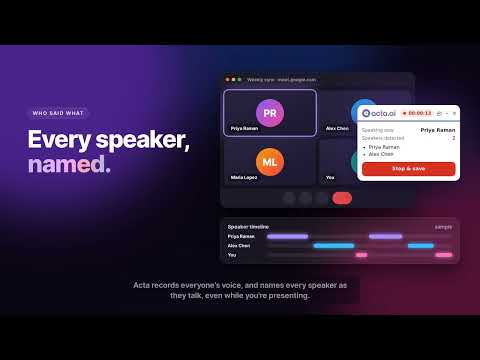
Acta AI Notes captures your Google Meet, Microsoft Teams and Zoom meetings two ways, so you choose what fits each call: • Record with extension (bot-free): Acta records the meeting right from your Chrome tab. No bot joins, nobody has to admit anyone, and the call looks exactly the same to everyone else. • Add notetaker: one click sends Acta Notetaker into the call as a participant. It records and takes notes even if you close your laptop. Use either one, or both in the same meeting. WHAT YOU GET IN ACTA • A full transcript with every speaker's name • A meeting summary and action items • Role-based outcomes: what each person needs to do next • The recording, searchable in your Acta dashboard HOW IT WORKS 1. Join your meeting in Chrome (Google Meet, Microsoft Teams on the web, or the Zoom web client). 2. Click the Acta icon in the toolbar. 3. Choose "Record with extension" or "Add notetaker". That's it. When the meeting ends, your notes appear in Acta. BUILT FOR ACCURATE SPEAKER NAMES • Records everyone else's voices from the meeting tab and your voice from your microphone, so every side of the conversation is captured. • Turns on the meeting's live captions automatically on Meet, Teams and Zoom, and reads who is speaking, so each line of the transcript has the right name. RELIABLE BY DESIGN • No share-screen prompt: recording starts with one click from the toolbar. • Every second is kept safely on your computer until Acta has it. If your internet drops, Chrome closes or you lose the tab, the meeting is still saved and uploaded when you're back. • Live meters show that both the meeting sound and your microphone are being captured. ALSO WORKS FOR DESKTOP APPS Record meetings held in the Zoom or Microsoft Teams desktop apps, too. FREE TRIAL Try Acta free for 15 days. Sign in with your Acta account to get started. PRIVACY Recordings go only to your own Acta account. Chrome asks once for your microphone; it is used only to record your own voice during meetings you choose to record. Please let participants know when a meeting is recorded, as your local laws and company policies require.
4.6 out of 518 ratings
Details
- Version3.2.0
- UpdatedOctober 19, 2026
- FeaturesOffers in-app purchases
- Size172KiB
- LanguagesEnglish
- DeveloperWebsite
Email
info@acta.ai - Non-traderThis developer has not identified itself as a trader. For consumers in the European Union, please note that consumer rights do not apply to contracts between you and this developer.
Privacy

Acta AI Notes: Bot-Free Recording + Notetaker for Meet, Teams, Zoom has disclosed the following information regarding the collection and usage of your data. More detailed information can be found in the developer's privacy policy.
Acta AI Notes: Bot-Free Recording + Notetaker for Meet, Teams, Zoom handles the following:
This developer declares that your data is
- Not being sold to third parties, outside of the approved use cases
- Not being used or transferred for purposes that are unrelated to the item's core functionality
- Not being used or transferred to determine creditworthiness or for lending purposes
Support
For help with questions, suggestions, or problems, please open this page on your desktop browser