

PrompX
1 rating
)
Overview
Browse, inject & save AI prompts from your PrompX library
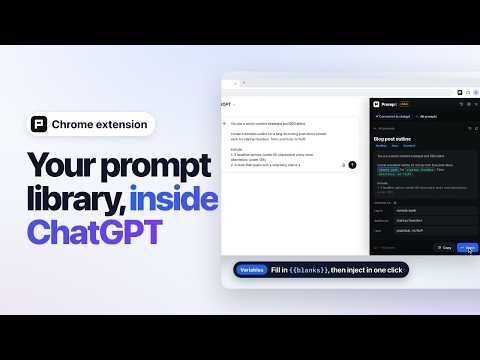
PrompX brings your AI prompt library to every chat platform — no more copy-pasting from docs or notes. Open any AI chat and your prompts are one click away. KEY FEATURES • Workbench — your full prompt library in Chrome's side panel, open beside any AI chat while you browse. Folders, favorites, tags and search on the left, prompts on the right. Prefer a compact popup? Switch in Settings. • Pebble — a compact PrompX button that sits right inside the chat composer of supported AI sites. Click it to find and inject a prompt without leaving the conversation. • Spotlight — press Alt+Shift+P on a supported AI page to open an instant search overlay. Type to search titles, prompt text and tags, then press Enter to inject. Choose your own shortcut any time. • Fill-in variables — prompts with {{variables}} open a quick form with every field at once, option chips like {{tone: formal / casual}}, a bigger box for code or long text, and a live preview. Values are remembered for your browser session. • Save from anywhere — highlight text on any webpage, right-click "Save to PrompX," and it lands in your library with the source URL. "AI fill metadata" names it and suggests tags for you. • New prompt in one click — write a prompt from scratch with the + button, or start from a ready-made template. • Version history (Pro) — browse and copy past versions of any prompt. • Pin favorites — keep your most-used prompts at the top. • Collections & tags — organize prompts into collections and tag them for fast filtering. • Sign in your way — email, Google, Apple, or a passwordless email link, right in the side panel. Sign in once on the PrompX dashboard and the extension stays in sync automatically. • Private by design — Spotlight runs in a private layer the AI site's own scripts can't read, your session stays inside the extension, and there's no third-party analytics. • Dark mode — follows your system theme or toggle manually. PrompX works with popular AI chat sites such as ChatGPT, Claude and Gemini, and more are added regularly. See the full list at https://prompx.app. PERFECT FOR • Prompt engineers who manage large prompt libraries • Content creators who reuse prompts across different AI tools • Developers and researchers running the same prompts on multiple models • Anyone who shares prompt collections with a link HOW IT WORKS 1. Install PrompX — a short tour shows you around, then helps you sign in, pin the icon and check your shortcut. 2. Create a free account or sign in (email, Google, Apple, or email link). 3. Open any supported AI chat — the Pebble appears inside the composer. 4. Click the Pebble or press Alt+Shift+P to open Spotlight, pick a prompt, fill in any variables, and inject it into the chat. 5. Highlight text on any page → right-click → "Save to PrompX" to capture new prompts as you browse. PrompX 1.5.1 — What's new • Behind-the-scenes improvements to sign-in and syncing. Requires a free PrompX account at https://prompx.app
5 out of 51 rating
Details
- Version1.5.1
- UpdatedOctober 12, 2026
- Offered byNexurift LLC
- Size709KiB
- LanguagesEnglish
- Developer
Email
hello@nexurift.com - Non-traderThis developer has not identified itself as a trader. For consumers in the European Union, please note that consumer rights do not apply to contracts between you and this developer.
Privacy

PrompX has disclosed the following information regarding the collection and usage of your data. More detailed information can be found in the developer's privacy policy.
PrompX handles the following:
This developer declares that your data is
- Not being sold to third parties, outside of the approved use cases
- Not being used or transferred for purposes that are unrelated to the item's core functionality
- Not being used or transferred to determine creditworthiness or for lending purposes
Support
For help with questions, suggestions, or problems, visit the developer's support site