

Virtual Card Helper

Overview
Unofficial side panel for your Capital One virtual card numbers. Not affiliated with or endorsed by Capital One.
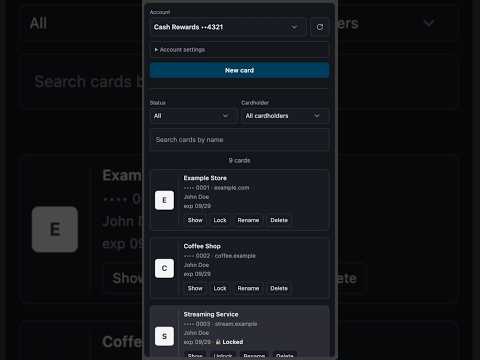
Keep the virtual card numbers on your Capital One account one click away, in a side panel next to whatever site you're shopping on. Virtual Card Helper is a free, independent, open-source extension. It is not made by, affiliated with, or endorsed by Capital One, and Capital One does not support it. WHAT IT DOES • Lists your virtual cards, with search, status filters and a cardholder filter • Suggests the cards that match the site you're on • Shows a card's number, expiry and security code, with copy buttons • Creates new cards, locks and unlocks them, renames them and deletes them HOW IT WORKS 1. Click the toolbar icon to open the side panel. 2. Sign in to Capital One as you normally would. The extension opens the page for you if you aren't signed in. 3. Your cards appear in the panel. To show a number or create a card, the extension briefly opens Capital One's own page, which may ask for a texted code once per session, then brings you back. YOUR PRIVACY • It only talks to Capital One, from your own signed-in tab. No other servers, no analytics, no tracking. • It never sees your password or your texted codes. You enter those on Capital One's own pages. • It never saves card numbers. Details you show stay in the panel for at most 3 minutes, then they're cleared. • To suggest cards, it searches your cards on Capital One using the first five letters of the site you're on. • Only your account nicknames and a few settings are saved, on your computer. PERMISSIONS • "Read and change your data on myaccounts.capitalone.com": to talk to Capital One from your signed-in tab. No other site. • "Read your browsing history": this is Chrome's name for reading the current tab's address, which the extension uses to suggest cards and to bring you back to the page you were on. It does not read or keep your history. GOOD TO KNOW • You need a Capital One credit card account and must sign in to Capital One yourself. • It can't fill in checkout forms; you copy and paste. • If Capital One changes its website, the extension may stop working until it's updated. "Capital One" is a trademark of Capital One Financial Corporation, used here only to say which accounts this extension works with. Questions or problems: caleb@calebdudleydesign.com Source code and privacy policy: https://github.com/AstroCaleb/virtual-cards-extension
0 out of 5No ratings
Details
- Version1.2.1
- UpdatedOctober 19, 2026
- Offered byCaleb
- Size52.52KiB
- LanguagesEnglish
- Developer
Email
caleb@calebdudleydesign.com - Non-traderThis developer has not identified itself as a trader. For consumers in the European Union, please note that consumer rights do not apply to contracts between you and this developer.
Privacy

Virtual Card Helper has disclosed the following information regarding the collection and usage of your data. More detailed information can be found in the developer's privacy policy.
Virtual Card Helper handles the following:
This developer declares that your data is
- Not being sold to third parties, outside of the approved use cases
- Not being used or transferred for purposes that are unrelated to the item's core functionality
- Not being used or transferred to determine creditworthiness or for lending purposes
Support
For help with questions, suggestions, or problems, visit the developer's support site