

AccuTrade VIN-dow
4 个评分
)
概述
Get the full power of AccuTrade synced inside all your favorite auctions.
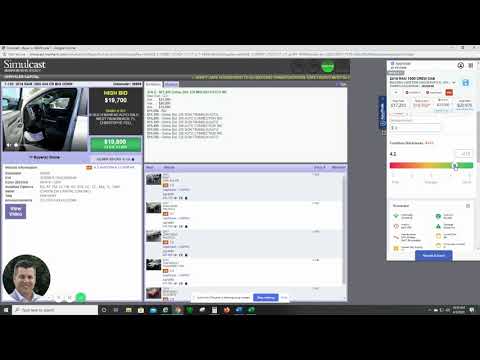
AccuTrade’s VIN-dow automatically shows you everything you need to know on any VIN as it comes up for sale in all your favorite online auctions. Bid and buy with complete confidence when you have instant access to deep insight on any vehicle. What it’s worth. Where it’s been. How long. What’s wrong. What’s right. And if it’s right for you. See it all live, and never miss a deal. No more clicking away from active sales. No searching for other application windows. No cutting and pasting vehicle IDs. VIN-dow does all the work and shows you everything as fast as you need to see it: • Target wholesale, retail & trade-in pricing guidance • Condition / option-based pricing adjustments • Retail “pedigree” (everywhere it’s been listed for how long and for how much) • Book values • Vehicle history reports • Live local market data • How the vehicle fits in your inventory • And more! Once you’ve installed this extension, here’s how to use VIN-dow: 1. Enable 3rd Party Cookies (Required for Login) 2. Log-in to AccuTrade using Chrome. 3. Log-in to any of the online auctions supported by the extension (see list of supported auctions below). 4. You will see the AccuTrade tab on the right side of your browser from any sale page. 5. Click the tab to open VIN-dow, and it automatically syncs to the active vehicle on the page. 6. Access any information on the current vehicle just as you would in AccuTrade.
5 星(5 星制)4 个评分
详情
- 版本1.129
- 上次更新日期2025年12月2日
- 提供方Accu-Trade
- 大小37.01KiB
- 语言English (United States)
- 开发者Accu-Trade LLC
300 S Riverside Plaza ste 100 Chicago, IL 60661 US邮箱
support@accu-trade.com - 非交易者该开发者尚未将自己标识为交易者。欧盟地区消费者须知:消费者权利可能不适用于您与该开发者达成的合约。
隐私权
该开发者已声明,您的数据:
- 不会因未获批准的用途出售给第三方
- 不会为实现与产品核心功能无关的目的而使用或转移
- 不会为确定信用度或放贷目的而使用或转移
支持
若有任何疑问、建议或问题,请访问开发者的支持网站