

AccuTrade VIN-dow
4 rating
)
Ringkasan
Get the full power of AccuTrade synced inside all your favorite auctions.
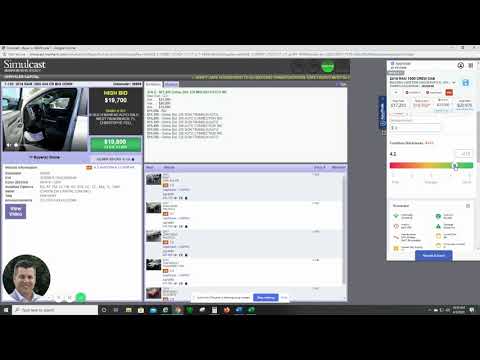
AccuTrade’s VIN-dow automatically shows you everything you need to know on any VIN as it comes up for sale in all your favorite online auctions. Bid and buy with complete confidence when you have instant access to deep insight on any vehicle. What it’s worth. Where it’s been. How long. What’s wrong. What’s right. And if it’s right for you. See it all live, and never miss a deal. No more clicking away from active sales. No searching for other application windows. No cutting and pasting vehicle IDs. VIN-dow does all the work and shows you everything as fast as you need to see it: • Target wholesale, retail & trade-in pricing guidance • Condition / option-based pricing adjustments • Retail “pedigree” (everywhere it’s been listed for how long and for how much) • Book values • Vehicle history reports • Live local market data • How the vehicle fits in your inventory • And more! Once you’ve installed this extension, here’s how to use VIN-dow: 1. Enable 3rd Party Cookies (Required for Login) 2. Log-in to AccuTrade using Chrome. 3. Log-in to any of the online auctions supported by the extension (see list of supported auctions below). 4. You will see the AccuTrade tab on the right side of your browser from any sale page. 5. Click the tab to open VIN-dow, and it automatically syncs to the active vehicle on the page. 6. Access any information on the current vehicle just as you would in AccuTrade.
5 dari 54 rating
Detail
- Versi1.133
- Diupdate6 Maret 2026
- Ditawarkan olehAccu-Trade
- Ukuran54.39KiB
- BahasaEnglish (United States)
- DeveloperAccu-Trade LLC
300 S Riverside Plaza ste 100 Chicago, IL 60661 USEmail
support@accu-trade.com - Non-pedagangDeveloper ini tidak mengidentifikasi diri sebagai pedagang. Bagi konsumen di Uni Eropa, perlu diperhatikan bahwa hak konsumen tidak berlaku untuk kontrak antara Anda dan developer ini.
Privasi

Developer ini menyatakan bahwa data Anda
- Tidak dijual ke pihak ketiga, di luar kasus penggunaan yang disetujui
- Tidak digunakan atau ditransfer untuk tujuan yang tidak terkait dengan fungsi inti item
- Tidak digunakan atau ditransfer untuk menentukan kelayakan kredit atau untuk tujuan pinjaman
Dukungan
Untuk mendapatkan bantuan terkait pertanyaan, saran, atau masalah, kunjungi situs dukungan developer