

WICK-AG-Lens: Accessibility Inspector

Overview
Visual accessibility inspector for Web Developers and QA.
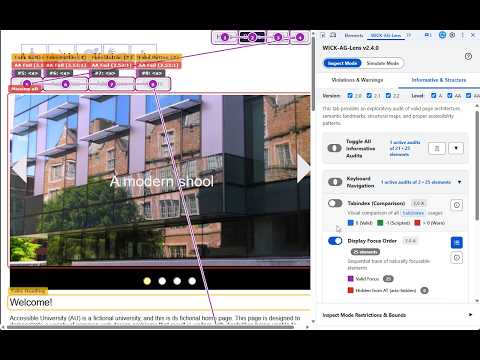
WICK-AG-Lens: Accessibility Inspector WICK-AG-Lens is a professional DevTools inspector that brings visual precision and tactical efficiency to web accessibility testing. It bridges the gap between code and user experience by drawing highly visible bounding boxes and color-coded badges directly over target elements on your live page. Built for maximum speed, security, and privacy with pure JavaScript and zero external dependencies, all checks run locally inside your Chrome DevTools panel without transmitting data or impacting page performance. --- WHAT SETS IT APART --- • Real-Time SPA & DOM Sync: Automatically detects Single Page Application (SPA) navigations and dynamic DOM mutations. When a user interacts with the page (e.g., opening a modal or expanding a dropdown), the extension instantly re-audits the injected or revealed elements without requiring a manual refresh. • Disability Simulation Engine: Toggle mathematically modeled visual filters directly in the DOM. Features include standard SVG color vision deficiency matrices (Protanopia, Deuteranopia, Tritanopia, Achromatopsia) alongside interactive Impaired Vision sliders for Diplopia, Loss of Contrast, Cataracts, and specific geometric Field of Vision Loss. • Strict WCAG Filtering: Dynamically filter your audits by specific WCAG Versions (2.0, 2.1, 2.2) and Conformance Levels (A, AA, AAA) to ensure you only see the issues relevant to your current compliance target. • X-Ray Vision for Clipped Elements: Renders hidden or off-screen interactive elements (like carousel slides) with a ghosted hatched pattern, allowing you to visualize hidden focus traps without breaking the page layout. • Dynamic Focus Tracing: The Display Focus Order audit utilizes SVG paths to draw sequential keyboard navigation routes across the screen, numbering elements and cleanly crossing into sub-documents and iframes. • Shadow DOM & Iframe Piercing: Utilizes custom deep bottom-up traversal logic to seamlessly evaluate encapsulated markup inside open Web Components and fully aggregate data across same-origin iframes. • Interactive Info Panels & Code Previews: Click any on-page badge to summon a detailed toast notification explaining what was flagged and why it creates a barrier, complete with dedicated copy buttons to instantly grab the code for bug reports. • Precision Element Locator: Open the View Elements modal and click the crosshair tool to instantly scroll a hard-to-find element into view, marking it with a highly visible pulsating ring. • Zero-Friction Reporting: Includes a one-click reporting feature that instantly copies formatted text reports of all active audits and findings to your clipboard for rapid ticket creation. --- INSPECT MODE: AUDIT LIBRARY OVERVIEW (41 AUDITS) --- The 41 independent heuristic evaluations are strictly divided to eliminate testing noise. TAB 1: VIOLATIONS & WARNINGS Isolates critical accessibility barriers, strict WCAG failures, and severe UI anti-patterns. [Group: Keyboard Navigation] • Unfocusable Clickables: Flags div/span elements with click handlers lacking tabindex and role attributes. • Disabled Focus Outlines: Heuristically detects interactive elements hiding CSS focus rings without fallbacks. • Tabindex Violations: Flags elements with tabindex > 0 that disrupt natural DOM navigation order. • Accesskey Attributes: Identifies hardcoded access keys that conflict with browser and screen reader shortcuts. [Group: Images & Media] • Missing Alt Text: Flags tags completely lacking an alt attribute. • Uncaptioned Video: Identifies elements lacking track captions or subtitles. • Redundant Alt Text: Flags image alt text containing redundant words like "image of" or "photo of". [Group: Forms & Controls] • Unlabeled Form Inputs: Flags inputs, selects, and textareas lacking associated labels, aria-labels, or wrappers. • Empty Buttons: Highlights buttons with no text content, ARIA labels, or child image alt text. • Placeholder as Label: Identifies form controls relying solely on disappearing placeholder text for identification. [Group: Links & Navigation] • Empty Links: Flags anchor tags lacking readable text, ARIA labels, or child image descriptions. • Suspicious Link Targets: Highlights links acting as fake buttons (href="#" or javascript:) without proper ARIA roles. • Generic Link Text: Flags ambiguous link text like "Click Here" or "Read More" using exact word boundaries. • Unwarned New Window Links: Identifies target="_blank" links lacking accessible warnings about opening new tabs. [Group: ARIA & Semantics] • Focusable in Aria-Hidden: Traps active focusable controls inside aria-hidden subtrees ("ghost focus"). • Invalid ARIA State: Highlights elements explicitly marked with aria-invalid="true". • Prohibited Author Names: Flags presentation/none roles that improperly attempt to define ARIA labels. [Group: Structure & Document] • Auto-playing Media: Flags audio or video elements configured to auto-play upon page load. • Heading Hierarchy Errors: Highlights skipped heading levels (e.g., H1 to H3) and fake heading classes. [Group: Visual & Contrast] • Text Color Contrast: Dynamically evaluates foreground and background contrast against WCAG AA/AAA thresholds based on font size and weight, flagging image overlays for manual check. TAB 2: INFORMATIVE & STRUCTURE Provides exploratory mapping of page architecture, focus routes, and valid semantic structures. [Group: Keyboard Navigation] • Tabindex (Comparison): Visualizes and color-codes all tabindex values (0, -1, >0) across the layout. • Display Focus Order: Traces and numbers the sequential TAB key navigation path across focusable elements. [Group: Images & Media] • Display Image Alternatives: Visually overlays and prints the alt text descriptions for all images on the page. • Captioned Video: Highlights video elements that correctly implement text track captions. • Iframe Context & Titles: Extracts and displays title descriptions and visibility states from embedded iframes. [Group: Forms & Controls] • Form Field Descriptions: Highlights supplemental instructions linked via aria-describedby or title attributes. • Fieldsets & Captions: Visualizes fieldset containers and legend titles used for grouping complex form controls. • Touch Target Sizes: Computes pixel dimensions of interactive controls to identify undersized targets (<24px, 24-43px, 44px+). [Group: Links & Navigation] • Warned New Window Links: Highlights target="_blank" links that properly communicate new window behavior. [Group: ARIA & Semantics] • Accessible Name Resolution: Computes and prints the resolved accessible name. • ARIA Roles & Attributes: Maps and displays all explicit role definitions throughout the DOM. • ARIA Live Regions: Visualizes dynamic content update containers (aria-live polite and assertive). • Required Fields: Highlights mandatory form fields enforced via HTML5 required or aria-required attributes. • Aria-Expanded State: Maps expandable and collapsible widgets, color-coded by true/false state. • Aria-Controls: Visualizes elements establishing remote control over other DOM containers. • Aria-Owns: Highlights parent/child relationships established outside the standard DOM hierarchy. [Group: Structure & Document] • Valid Heading Order: Maps the logical structural outline of standard H1 through H6 headings. • Landmark Regions: Highlights native HTML5 and ARIA landmark containers (main, nav, header, footer, etc.). • Table & Grid Structure: Visualizes native tables, headers, captions, and custom ARIA data grids. • Lists and List Items: Maps semantic unordered (ul), ordered (ol), and description (dl) list structures. • Language Definitions: Maps the root HTML language tag and mid-page inline language shifts. --- SIMULATE MODE: DISABILITY SIMULATION ENGINE --- The Simulate Mode provides an empathetic heuristic overlay to help developers identify critical contrast and layout barriers by simulating severe visual impairments directly in the DOM. These modules map to documented mathematical approximations rather than applying arbitrary color tints. TAB 1: COLOR VISION DEFICIENCIES (CVD) • Achromatopsia (Monochromacy): True grayscale conversion mapped strictly to WCAG relative luminance formulas. • Protanopia & Deuteranopia: Red/green blindness simulated using precise physiological Viénot models. • Tritanopia: Blue-blindness simulated via high-performance linear approximations. TAB 2: IMPAIRED VISION PHYSIOLOGY • Double Vision (Diplopia): Simulates a secondary ghosted image offset from the original content. • Loss of Contrast: Authentically reduces text distinguishability while maintaining structural color, avoiding flawed grayscale conversions. • Yellowing (Aging Lens): Replicates the biological absorption of blue light over time rather than applying a generic sepia tone. • Cataracts: Simulates progressive clouding, light scattering, and opacity through intertwined blurring and contrast drops. • Field of Vision Loss: Emulates Central Loss (Macular Degeneration) and Peripheral Loss (Glaucoma/Tunnel Vision) using strict geometric boundaries. --- ENTERPRISE-GRADE PRIVACY --- Because WICK-AG-Lens operates entirely locally within your browser's DevTools, it never tracks your data, never sends telemetry, and requires no external API calls. It is completely safe to use on internal corporate networks, localhost development environments, and sensitive client applications. --- HOW TO USE IT --- 1. Install the extension. 2. Open Chrome Developer Tools (F12 or Ctrl+Shift+I / Cmd+Option+I). 3. Navigate to the WICK-AG-Lens tab in the DevTools menu. 4. Toggle your WCAG filters, activate your audits or simulations, and inspect the accessibility barriers directly on your page.
0 out of 5No ratings
Details
- Version2.4.2
- UpdatedOctober 28, 2026
- Offered bySebastian Clavijo Suero
- Size14.93MiB
- LanguagesEnglish (United States)
- Developer
Email
sclavijosuero@gmail.com - Non-traderThis developer has not identified itself as a trader. For consumers in the European Union, please note that consumer rights do not apply to contracts between you and this developer.
Privacy

WICK-AG-Lens: Accessibility Inspector has disclosed the following information regarding the collection and usage of your data. More detailed information can be found in the developer's privacy policy.
WICK-AG-Lens: Accessibility Inspector handles the following:
This developer declares that your data is
- Not being sold to third parties, outside of the approved use cases
- Not being used or transferred for purposes that are unrelated to the item's core functionality
- Not being used or transferred to determine creditworthiness or for lending purposes
Support
For help with questions, suggestions, or problems, visit the developer's support site