Item logo image for Accelerator Keys by 8apps

Accelerator Keys by 8apps

8apps.co
5.0(

1 rating

)
Item media 6 (screenshot) for Accelerator Keys by 8apps
Item video thumbnail
Item media 2 (screenshot) for Accelerator Keys by 8apps
Item media 3 (screenshot) for Accelerator Keys by 8apps
Item media 4 (screenshot) for Accelerator Keys by 8apps
Item media 5 (screenshot) for Accelerator Keys by 8apps
Item media 6 (screenshot) for Accelerator Keys by 8apps
Item video thumbnail
Item media 2 (screenshot) for Accelerator Keys by 8apps
Item media 3 (screenshot) for Accelerator Keys by 8apps
Item media 4 (screenshot) for Accelerator Keys by 8apps
Item media 5 (screenshot) for Accelerator Keys by 8apps
Item media 6 (screenshot) for Accelerator Keys by 8apps

Overview

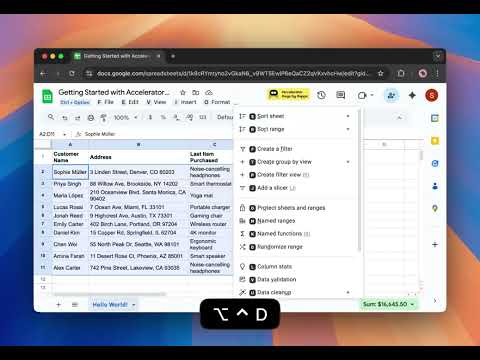
Master Google Workspace shortcuts - one key at a time.

Accelerator Keys by 8apps makes keyboard shortcuts in Google Docs, Sheets, and Slides simple, discoverable, and effortless. Work faster without memorizing a thing. _______________________________________ Accelerator Keys by 8apps helps you learn and use Google Workspace shortcuts visually, right inside the apps you already use - Docs, Sheets, Slides, Gmail, and Calendar. Instead of pressing complex key combinations, Accelerator Keys shows you every shortcut and command as you go - one key at a time. Whether you’re formatting text in Docs, inserting rows in Sheets, or managing events in Calendar, Accelerator Keys helps you navigate and act instantly with real-time shortcut hints and overlays. What You Can Do with Accelerator Keys ________________________________________ ⚡ Discover shortcuts visually: Open the overlay to see available keys and actions without leaving your document. ⌨️ Learn by doing: Follow the visual hints and build muscle memory naturally. 🧭 Navigate menus faster: From “File → Download → PDF” to “Insert → Row → Below” - type less, do more. 📅 Work across apps: Fully compatible with Google Docs, Sheets, Slides, Gmail, and Calendar. 🧠 Simplify learning: Perfect for new users or pros wanting to unlock the full power of Workspace. Why You’ll Love It ___________________ Accelerator Keys is not about pressing multiple keys at once - it’s about discovering shortcuts step by step, like navigating a map with one key at a time. It’s designed for people who love working fast, learning visually, and keeping hands on the keyboard. Perfect For • Google Workspace power users • Productivity enthusiasts • Students, analysts, writers, and managers • Anyone tired of clicking through menus How It Works ______________ • Install the extension. • Open any Google app (Docs, Sheets, Slides, Gmail, Calendar). • Press Alt (Windows) or Option (Mac) to activate Accelerator Keys. • Follow the visual key hints to perform actions instantly. Built by 8apps _______________ 8apps creates simple, powerful Google Workspace tools that make everyday work faster and smarter - from managing files to automating reports. Visit us at www.8apps.co

Details

  • Version
    1.0.2
  • Updated
    October 30, 2025
  • Size
    507KiB
  • Languages
    English
  • Developer
    Neo42
    Website
    Email
    support@8apps.co
  • Non-trader
    This developer has not identified itself as a trader. For consumers in the European Union, please note that consumer rights do not apply to contracts between you and this developer.

Privacy

Accelerator Keys by 8apps has disclosed the following information regarding the collection and usage of your data. More detailed information can be found in the developer's privacy policy.

Accelerator Keys by 8apps handles the following:

Personally identifiable information

This developer declares that your data is

  • Not being sold to third parties, outside of the approved use cases
  • Not being used or transferred for purposes that are unrelated to the item's core functionality
  • Not being used or transferred to determine creditworthiness or for lending purposes

Support

Related

Todoist Shortcuts (GMail / vim inspired)

4.9

Adds a comprehensive suite of keyboard shortcuts to Todoist. More info: https://github.com/mgsloan/todoist-shortcuts

CLUT: Cycle Last Used Tabs

4.6

Cycle through last used Chrome tabs using keyboard shortcut.

Docs Hotkey

4.6

Create hotkeys for Google Docs

Close All Tabs

4.8

Find out how to close all tabs in chrome with one click. Delete, remove, clear, and close all tabs at once in google easily!

Shortcut Tab Switcher

4.6

Shortcut Tab Switcher: tab switcher for handy switching with customizable keyboard hotkeys. Instant switching! 🚀

Quick Create Google Workspace

5.0

Quickly access your favorite Google Workspace apps like Docs, Sheets, Slides, and more. Save time and boost your productivity!🚀

BrowseCut | Navigate with Keyboard Hotkeys, Vim Motions, Vimium Shortcuts

4.7

Cut time browsing. Just type to click links and navigate. Be productive, prevent RSI, stay in flow with smart shortcuts.

Sharp Tabs - Best Vertical Tabs Suspender & Organizer!

5.0

Instant Search. Advanced Suspend. AI Integrations. Auto Session Backups. Duplicates. Workspaces. Themes. and Much More!

Classroom Tweaks

0.0

Quality-of-life modifications for Google Classroom™

Create Google Doc

5.0

Easily create Google Doc from your browser bar. Paste without formatting into new Google Docs with just one click!

New Doc

4.9

Use New Doc - easily create Google doc, Sheets and open docs with a click. Easy workflow for create Form and new google doc (gdocs).

Simplehuman, keyboard shortcuts and command bar for Gmail

4.9

Advanced keyboard shortcuts, natural language snooze, and smart email management features for Gmail.

Todoist Shortcuts (GMail / vim inspired)

4.9

Adds a comprehensive suite of keyboard shortcuts to Todoist. More info: https://github.com/mgsloan/todoist-shortcuts

CLUT: Cycle Last Used Tabs

4.6

Cycle through last used Chrome tabs using keyboard shortcut.

Docs Hotkey

4.6

Create hotkeys for Google Docs

Close All Tabs

4.8

Find out how to close all tabs in chrome with one click. Delete, remove, clear, and close all tabs at once in google easily!

Shortcut Tab Switcher

4.6

Shortcut Tab Switcher: tab switcher for handy switching with customizable keyboard hotkeys. Instant switching! 🚀

Quick Create Google Workspace

5.0

Quickly access your favorite Google Workspace apps like Docs, Sheets, Slides, and more. Save time and boost your productivity!🚀

BrowseCut | Navigate with Keyboard Hotkeys, Vim Motions, Vimium Shortcuts

4.7

Cut time browsing. Just type to click links and navigate. Be productive, prevent RSI, stay in flow with smart shortcuts.

Sharp Tabs - Best Vertical Tabs Suspender & Organizer!

5.0

Instant Search. Advanced Suspend. AI Integrations. Auto Session Backups. Duplicates. Workspaces. Themes. and Much More!

Google apps