

Abookmark - advanced bookmark manager

Descripción general
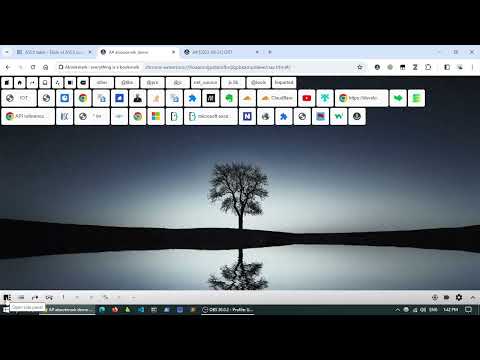
Advanced bookmark manager and tab organizer to enhance the native bookmarks and tabs
## Main Features - Cooperate with native bookmark system. - Labels/Tags. - Spread view & top bar. - Advanced search. - Recent bookmarks. - Link replacing. - Tab / session managements. - Tabs as bookmarks. - Side panel & vertical tab bar with tab groups. - Workspace. - Data view. Copy bookmark or tab information to the clipboard. - Data text editor. (edit bookmarks in your favorite text editor) - Extract links from web page. - Keyboard shortcuts. - Link hint. (vi-like keyboard) - Bookmark keywords - Add new bookmark at the top. - Export any bookmark folder. - Import selected bookmarks from a file. - Monthly backup. - Auto sync. ## Introduction Abookmark is a professional bookmark viewer and manager. It has a manager page similar to the native bookmark manager and a navigation page similar to the native bookmark bar. And it is also a tab and session manager at the same time. What does a typical tab manager look like? They save tabs in one place, and then close tabs. These saved tabs can be divided into groups, which are called workspaces. You can reopen these tabs later, or open the entire group. They also provides simple data management functions, such as deleting, renaming, and moving between groups. What is the essence of this saved data? It's just a list of web addresses. In fact they are bookmarks. The so-called workspace is in fact a bookmark folder, and the so-called tab manager is a simplified bookmark manager. So, why can't you just use the bookmark manager to manage tabs? This can have a number of benefits: 1. More flexible data structure. Bookmarked folders can be nested, you may call it sub-workspace if you want. 2. More comprehensive data management functions. 3. More secure data storage. 4. Automatic data synchronization. Browsers usually come with a synchronization feature for bookmark data, which can even be used on mobile phones. 5. Cooperation between tabs and bookmarks. Of course, some of the details of tab management are unique, which requires the bookmark manager to add corresponding support. In fact, some users already use the native bookmark management system to manage tabs manually, and there are also tab management plugins that are dedicated to saving tabs as bookmarks. Abookmark goes one step further by abstracting bookmarks and tabs into nodes. Bookmarks are sleeping tabs, while tabs are active bookmarks. Tabs can also be manipulated through the tab nodes, and tab groups are mapped to folders. Using tab nodes on the side panel is similar to the vertical tab bar of Edge, but with the ability to communicate with bookmarks. Abookmark offers a high degree of freedom, which is a double-edged sword. In addition, Abookmark also offers some advanced features. New users should familiarize themselves with the basic logic before gradually exploring more powerful features. https://www.abookmark.org ## Privacy All your bookmarks are stored in your browser system. Abookmark does not transfer them to anywhere else.
4,2 de 539 valoraciones
Detalles
- Versión0.46.8
- Actualizado7 de octubre de 2025
- FuncionesOfrece compras en aplicaciones
- Tamaño1.27MiB
- Idiomas2 idiomas
- DesarrolladorSitio web
Correo electrónico
abookmark.dev@outlook.com - No operadorEste desarrollador no se ha identificado como operador. Los consumidores residentes en la Unión Europea deben tener en cuenta que los derechos de los consumidores no son aplicables a los contratos que suscriban con este desarrollador.
Privacidad

Este desarrollador declara que tus datos:
- No se venden a terceros, excepto en los casos de uso aprobados
- No se usan ni se transfieren para fines no relacionados con la función principal del elemento.
- No se usan ni se transfieren para determinar la situación crediticia ni para ofrecer préstamos.
Ayuda
Si tienes alguna pregunta, sugerencia o problema, visita el sitio de asistencia del desarrollador.