


概要
Export HTML tag element attributes to CSV only by entering a HTML query selector.
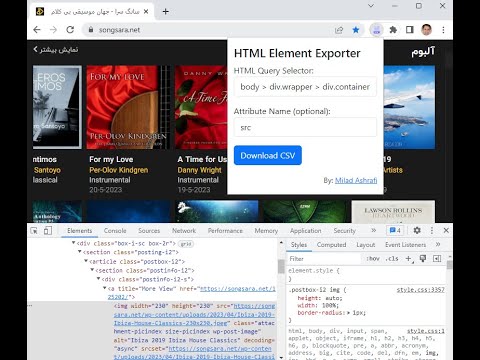
HTML Tag Elements Attribute CSV Exporter This chrome extension allows you to export the attribute values (or outer HTML) of selected HTML elements on any web page as a CSV file. You can use this extension to extract data from web pages for analysis, research, or backup purposes. How to use this extension: To use this extension, follow these steps: 1. Install the extension from the Chrome Web Store. 2. Go to any web page that you want to extract data from. 3. Click on the extension icon in the toolbar. A popup will appear with two text boxes: one for selector html query and another for attribute name. 4. In the selector html query text box, enter a valid CSS selector that matches the HTML elements you want to export. For example, if you want to export all the links on the page, you can enter a as the selector. If you want to export only the links with a specific class name, you can enter a.className as the selector. You can use any CSS selector syntax supported by Chrome. For more information on CSS selectors search on google. 5. In the attribute name text box, enter the name of the attribute that you want to export for each element. For example, if you want to export the href attribute of each link, you can enter href as the attribute name. If you want to export the outer HTML of each element, you can leave this text box empty. 6. Click on the Download CSV button. A CSV file will be downloaded to your default download location. The file will contain one row for each element that matches your selector, and one column for the attribute value (or outer HTML) of each element. Feedback and support: If you have any questions, suggestions, or issues with this extension, please contact me by Telegram at (https://miladashrafi.t.me). I appreciate your feedback and support. Thank you for using HTML Tag Elements Attribute CSV Exporter!
5 点満点で 55 件の評価
詳細
プライバシー

このデベロッパーは、お客様のデータについて以下を宣言しています
- 承認されている以外の用途で第三者に販売しないこと
- アイテムの中心機能と関係のない目的で使用または転送しないこと
- 信用力を判断する目的または融資目的で使用または転送しないこと
サポート
質問や提案、問題がある場合は、パソコンのブラウザでこのページを開いてください