


Overview
Manually suspend tabs to free up memory without closing them.
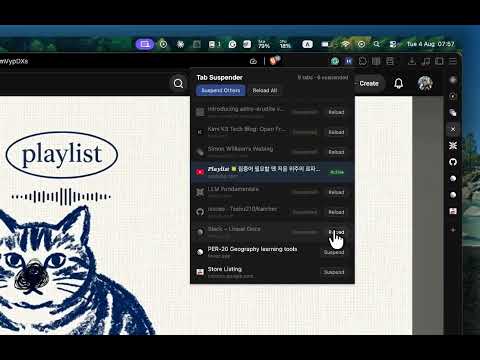
Tab Suspender gives you a simple, manual way to reclaim memory from tabs you're not using — without losing them. Open the popup to see every tab in the current window, then: Tab Suspender provides a straightforward, manual method to free up memory from tabs you aren’t using, without closing them. Open the popup to see all tabs in the current window, then: • Suspend any tab with a single click • "Suspend Others" — keep your current tab active, suspend all others • "Reload All" — instantly restore all suspended tabs • Click any listed tab to jump directly to it Suspended tabs remain in your tab strip exactly where they are. Their title and icon stay visible, and they reload immediately when clicked. Tab Suspender offers a simple, minimal design: • Fully manual — only suspend tabs when you choose to • Pinned tabs, active tabs, and tabs playing audio are never affected • No background processes, timers, or bloat • No data collection — the extension stays entirely within your browser It uses Chrome's native tab discarding technique, the same system Chrome employs when managing memory pressure.• Suspend any single tab with one click • "Suspend Others" — keep the tab you're on, suspend everything else • "Reload All" — bring every suspended tab back instantly • Click any tab in the list to jump straight to it Suspended tabs stay exactly where they are in your tab strip. Their title and icon remain visible, and they reload the moment you click them. Tab Suspender is deliberately minimal: • Fully manual — nothing is suspended unless you say so • Pinned tabs, tabs playing audio, and your active tab are never touched • No background processes, no timers, no bloat • No data collection of any kind — the extension never leaves your browser Uses Chrome's native tab discarding, the same mechanism Chrome itself uses under memory pressure.
0 out of 5No ratings
Details
- Version1.0.0
- UpdatedAugust 5, 2026
- Size15.67KiB
- LanguagesEnglish
- DeveloperWebsite
Email
tsekulen@gmail.com - Non-traderThis developer has not identified itself as a trader. For consumers in the European Union, please note that consumer rights do not apply to contracts between you and this developer.
Privacy

This developer declares that your data is
- Not being sold to third parties, outside of the approved use cases
- Not being used or transferred for purposes that are unrelated to the item's core functionality
- Not being used or transferred to determine creditworthiness or for lending purposes