


Overview
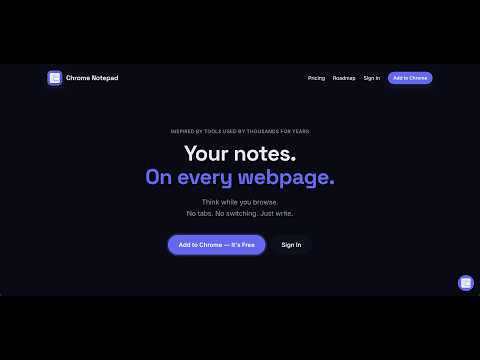
Your notes and tasks. On every webpage without switching tabs, fixed popups or side-panels
Chrome Notepad - Your notes and tasks. On every webpage without switching tabs, fixed popups or side-panels. Take notes on any webpage without leaving the page. No side panels. No popups. No tab switching. Chrome Notepad puts a resizable, draggable notepad directly on every webpage you visit; keeping your notes in focus while you read, research, or write. WHAT MAKES CHROME NOTEPAD DIFFERENT Unlike traditional note apps that force you to switch between tabs, Chrome Notepad stays right there on the page. Highlight text. Take notes. Never lose focus. Perfect for researchers, students, and anyone who reads and takes notes online. FEATURES (All Free) ✓ Notes stay on the page — Resizable, draggable notepad ✓ Highlight text and capture it — Sticky highlights convert directly to notes ✓ Rich text formatting — Bold, colours, to-do lists, and more ✓ Auto-saves locally — Never lose a note, works offline ✓ Backup to Google Drive — Unlimited backups, unlimited restores ✓ Share notes — Send via link or email ✓ Export to PDF — Download anytime ✓ Access from web and phone — View all your notes anywhere HOW IT WORKS 1. Install Chrome Notepad 2. Open any webpage 3. Click the icon (or press Ctrl+Shift+O) to expand the notepad 4. Take notes while you read — the notepad stays on the page 5. Highlight text to add directly to notes 6. Archives automatically when you create new notes. 7. Access archive from extension icon in menu that opens an app 7. Access all notes anytime from the web app PERFECT FOR ✓ Researchers taking notes from multiple sources ✓ Students annotating articles and web content ✓ Writers capturing inspiration mid-read ✓ Anyone who reads and takes notes online WHY CHROME NOTEPAD? "I was copying and pasting into separate note apps, losing focus. Chrome Notepad lets me stay in the browser, highlight as I read, and keep everything organised without switching tabs." See the full workflow: https://youtu.be/suh1pBnXz2U?si=szrbBWxs0B5Yjhmw PRIVACY & SECURITY Your notes stay on your device. Backups are encrypted and secure. We never access your data. PERMISSIONS ✓ Storage — To save notes locally ✓ Google Drive (optional) — For backups you control GET STARTED Chrome Notepad is 100% free. All features are always free. Install now and simplify how you take notes online. --- OPTIONAL: Try the web app at chromenotepad.com for editing notes and accessing them from your phone. Learn more: chromenotepad.com
0 out of 5No ratings
Details
- Version0.0.5
- UpdatedMay 14, 2026
- Size1.11MiB
- LanguagesEnglish
- DeveloperFINMATRIX CAPITAL PRIVATE LIMITEDWebsite
H.NO-111, BOXIRHAT, Barokodali, Tufanganj - II, Cooch Behar Cooch Behar, West Bengal 736159 INEmail
barman.rajdeep@gmail.comPhone
+91 99011 83838 - TraderThis developer has identified itself as a trader per the definition from the European Union and committed to only offer products or services that comply with EU laws.
- D-U-N-S756070268
Privacy

Chrome Notepad has disclosed the following information regarding the collection and usage of your data. More detailed information can be found in the developer's privacy policy.
Chrome Notepad handles the following:
This developer declares that your data is
- Not being sold to third parties, outside of the approved use cases
- Not being used or transferred for purposes that are unrelated to the item's core functionality
- Not being used or transferred to determine creditworthiness or for lending purposes
Support
For help with questions, suggestions, or problems, please open this page on your desktop browser