


Overview
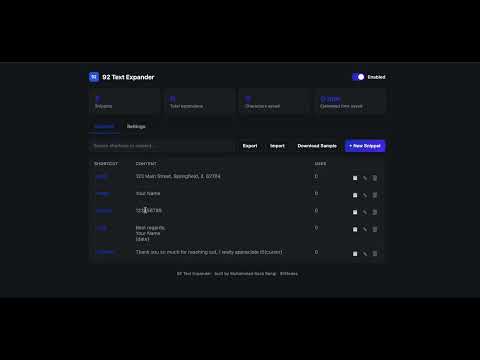
Type shortcuts like ;addr or ;sig and instantly expand them into full text. Pause any snippet with one click. Fast & private.
Type Less. Write Faster. 92 Text Expander is a fast, lightweight, and privacy-first Chrome extension that helps you save time by expanding short text shortcuts into full words, sentences, templates, and responses while you type. Instead of typing the same information repeatedly, create your own custom shortcuts and let 92 Text Expander instantly replace them with your full text. Example Shortcuts ● ;sig → Your email signature ● ;addr → Your full address ● ;email → Your email address ● ;thanks → Thank you for your message. I appreciate your time. ● ;meeting → Meeting invitation template ● ;support → Frequently used customer support response Key Features: ✔ Create unlimited text shortcuts ✔ Instant text expansion while typing ✔ Pause or resume individual snippets with one click ✔ Enable or disable text expansion anytime ✔ Works across most websites ✔ Simple and intuitive interface ✔ Lightweight and fast ✔ No account required ✔ No subscription ✔ Local browser storage ✔ Privacy-first design Perfect For: ● Customer Support ● Developers ● Sales Teams ● Freelancers ● Students ● Writers ● Business Professionals ● Anyone who types repetitive text Why You'll Love It: ● Save hours of repetitive typing ● Improve productivity ● Reduce typing mistakes ● Stay consistent with reusable templates ● Speed up emails, forms, chats, and documents ● Privacy Privacy: Your snippets and settings are stored locally using Chrome's storage. 92 Text Expander does not collect, transmit, track, sell, or share your personal data or the text you type. Everything stays on your device.
5 out of 53 ratings
Details
- Version1.1.0
- UpdatedJuly 15, 2026
- Size34.09KiB
- LanguagesEnglish
- DeveloperWebsite
Email
muhammadrazabangi9@gmail.com - Non-traderThis developer has not identified itself as a trader. For consumers in the European Union, please note that consumer rights do not apply to contracts between you and this developer.
Privacy

This developer declares that your data is
- Not being sold to third parties, outside of the approved use cases
- Not being used or transferred for purposes that are unrelated to the item's core functionality
- Not being used or transferred to determine creditworthiness or for lending purposes