

Overview
2FA authenticator for your computer: scan a QR code, fill TOTP codes in one click, import from Google Authenticator. Encrypted sync.
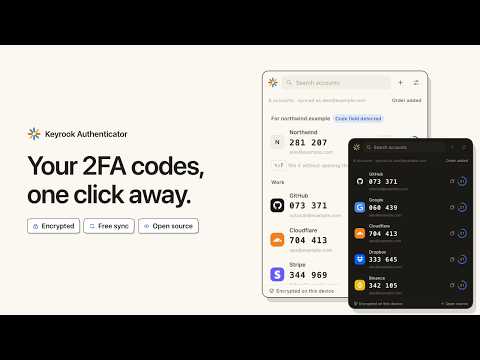
Keyrook Authenticator is a free 2FA app for your computer. It makes the six-digit codes that your bank and other sites with two-factor authentication ask for when you sign in, right in your browser, so you no longer reach for your phone. Already use Google Authenticator on your phone? Bring your accounts to your computer in a couple of minutes. ⚡ YOUR 2FA CODE, WHERE YOU SIGN IN • Click the toolbar icon: every account is there, with its current code and a countdown • One click copies a code, or fills it straight into the page's code field • On a sign-in page, the account that belongs to that site comes first • Alt+Shift+F fills the code for the page without opening anything, wherever exactly one account belongs to the site • Search, groups and logos for over 500 services keep a long list easy to read 📲 MOVE YOUR 2FA ACCOUNTS FROM YOUR PHONE 1. In Google Authenticator on your phone, open the menu and choose Transfer accounts, then Export accounts 2. In the extension, choose Scan with your camera and hold the phone up to the webcam. Or take screenshots of the codes and upload them, several at once 3. Your accounts appear, making the same codes as your phone Coming from another app? Import the export files of many other two-factor apps, even password-protected ones. A password manager's CSV export works too: only the column with the codes is read, and the passwords in the file are never kept. ➕ ADD A NEW ACCOUNT IN SECONDS • When a site shows a QR code to set up two-step verification, open the extension and choose Scan the QR code on this page. It reads that one tab, and only when you ask • Or point your camera at a code on another screen, upload a picture of it, or paste the setup key • Just need one code, once? Paste a key and see its code, without saving anything 🔄 OPTIONAL SYNC BETWEEN YOUR COMPUTERS • Sign in with Google, GitHub or an email address, and the same accounts appear in every browser you sign in to • End-to-end encrypted: everything is encrypted on your device before it is uploaded, with a key the server never receives. We store your codes but cannot read them • A new browser joins only when one already signed in approves it, after you check that both show the same code, or with your recovery key • See every signed-in browser, and sign any of them out • Free, like everything else here 🔐 YOUR VAULT, LOCKED YOUR WAY • Just start: your accounts are encrypted with a key your browser keeps, and there is nothing to remember • Or set a master password: the vault locks itself after the delay you choose, and nothing on the computer opens it without the password • A recovery key on a printable sheet is the way back if the password is forgotten. Nobody else can reset it, us included • Blur the codes until you point at them, for when you share your screen 🛡️ WHY IT IS SAFE TO TRUST • AES-256-GCM encryption on your own device, and a master password stretched with 600,000 rounds of PBKDF2 • No access to the websites you visit. Reading a QR code or filling a code works only on the tab where you open the extension, and only when you ask • The camera turns on only when you ask to scan, and what it sees never leaves your computer • No ads, no analytics, no tracking. Logos are built in, never downloaded, so no server learns which services you use • Open source under GPL-3.0: anyone can read the code and rebuild this exact extension from it 💾 BACKUPS, AND LEAVING WHENEVER YOU LIKE • Encrypted backups to a file, of every account or the ones you pick, to restore anywhere • Moving to another app? Pick it, and the extension shows the quickest way: Google Authenticator's own transfer codes, a file it can import, or one QR code after another for apps that import nothing in bulk • Print the setup codes of every account on one sheet, to keep somewhere safe ⏰ A CODE REJECTED? CHECK THE CLOCK Codes are worked out from the current time, so a computer whose clock is a minute off makes codes that sites refuse. If a fresh code is rejected, set your computer's date and time to update automatically, and try the next one. ❓ QUESTIONS PEOPLE ASK • Do I still need my phone? No. The codes on your computer are the same as on your phone; keep both if you like. • Does it work offline? Yes. Codes are made on your computer; only sync needs a connection. • What if I lose this computer? With sync, sign in on the next one. Without it, restore an encrypted backup, or use your recovery key. • Which sites does it work with? Any site that lets you turn on two-step verification with an app, a QR code or a setup key: email, social networks, cloud storage, crypto exchanges, banks and more. • Which codes? Time-based and counter-based one-time password codes, TOTP (RFC 6238) and HOTP (RFC 4226), with SHA-1, SHA-256 or SHA-512, 6 to 10 digits and any period. Steam Guard codes too. • Is it really free? Yes, every feature, sync included. There is no paid version. 🌍 50 LANGUAGES The extension speaks your browser's language, or the one you choose in Settings, in a light or dark theme. 🔑 NEW TO TWO-FACTOR AUTHENTICATION? It adds a second step when you sign in: after your password, the site asks for a six-digit code that changes every 30 seconds and that only your device can make. Someone who steals your password still cannot get in. Turn it on in the security settings of each account you care about, scan its QR code with this extension, and you are done. Open source (GPL-3.0): https://github.com/keyrook/keyrook-authenticator
5 out of 52 ratings
Details
- Version0.4.1
- UpdatedOctober 27, 2026
- Size1.63MiB
- Languages55 languages
- DeveloperBrick It All LLCWebsite
1001 S. Main St. STE 600 Kalispell, MT 59901 USEmail
brickitall.hi@gmail.com - Non-traderThis developer has not identified itself as a trader. For consumers in the European Union, please note that consumer rights do not apply to contracts between you and this developer.
Privacy

2FA Authenticator - Keyrook has disclosed the following information regarding the collection and usage of your data. More detailed information can be found in the developer's privacy policy.
2FA Authenticator - Keyrook handles the following:
This developer declares that your data is
- Not being sold to third parties, outside of the approved use cases
- Not being used or transferred for purposes that are unrelated to the item's core functionality
- Not being used or transferred to determine creditworthiness or for lending purposes
Support
For help with questions, suggestions, or problems, visit the developer's support site