

2026 OnceTool — Peek Top YouTube Comments

Overview
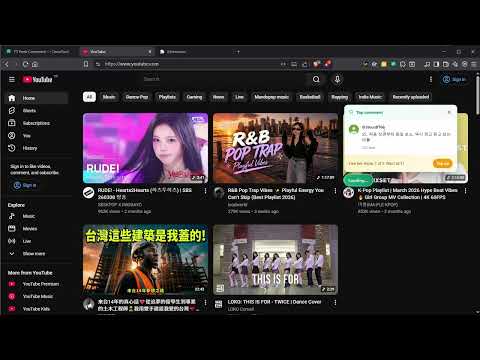
Peek top YouTube comments on hover: pause on any thumbnail → click the badge → see the most-liked viewer comments before you click.…
2026 OnceTool — Preview YouTube Top Comments Before Watching No more clicking into a video only to find out the comment section is overwhelmingly negative. Hover over any YouTube thumbnail, and a comment bubble icon will appear in the lower-left corner. Click it to instantly preview the video’s top comments, then decide whether it is worth your time. Why we built this “Strong title, empty content” happens every day. Likes can show popularity, but comments reveal the real reaction: praise, criticism, sarcasm, or controversy. This Chrome extension brings the key signals from the comment section to the moment before you click. Get started in three steps Add it to Chrome and pin it to your toolbar Log in with OnceAccount, or activate with a license key after anonymous purchase Open YouTube, hover over a thumbnail, and click the comment bubble icon in the lower-left corner What you will see Top comment preview, sorted by relevance Free users see 1 comment per query; paid users can unlock 3 comments per query Works on the homepage, search results, channel pages, Shorts, and other thumbnail areas 7-day server cache makes repeat queries for the same video faster Does not change YouTube’s original layout; the entry only appears on hover Data source and what we do not do Source: YouTube Data API v3 commentThreads.list We do not: Scrape YouTube pages Use unofficial or private APIs Collect your YouTube watch history Each query only sends the video ID to the OnceTool backend and returns comment data. Login status and device information are stored in chrome.storage.local. Pricing Credit-based pricing, not a monthly subscription. Each query costs 1 credit Default free daily allowance is currently 10 queries per day After exceeding the free allowance, you can top up credits to continue using it Supports purchase through OnceAccount, or anonymous purchase activated with a license key Two usage modes With OnceAccount: Credits can sync across devices Purchase history can be checked With license key: A license key will be sent to your email after payment Paste the key into the popup to activate Please keep your key safe. Lost keys cannot be resent About OnceTool OnceTool is a small-tool series from the OnceHit family. Each tool is an independent Chrome extension focused on solving one specific pain point, using official APIs and following platform policies. Other products in the family: OnceEvent — In-store purchase lottery platform OnceClip — AI video generation OnceKeeper — Collection and sharing community OncePing — Website monitoring Maintained by the OnceHit team. Support Customer support: oncehit.service@gmail.com Service status: tool.oncehit.net
5 out of 52 ratings
Details
- Version0.1.1
- UpdatedMay 24, 2026
- Size181KiB
- Languages55 languages
- Developer
- TraderThis developer has identified itself as a trader per the definition from the European Union and committed to only offer products or services that comply with EU laws.
Privacy

2026 OnceTool — Peek Top YouTube Comments has disclosed the following information regarding the collection and usage of your data. More detailed information can be found in the developer's privacy policy.
2026 OnceTool — Peek Top YouTube Comments handles the following:
This developer declares that your data is
- Not being sold to third parties, outside of the approved use cases
- Not being used or transferred for purposes that are unrelated to the item's core functionality
- Not being used or transferred to determine creditworthiness or for lending purposes
Support
For help with questions, suggestions, or problems, visit the developer's support site