

101weiqi Enhancer

Overview
Small Enhancer tools for 101weiqi.com
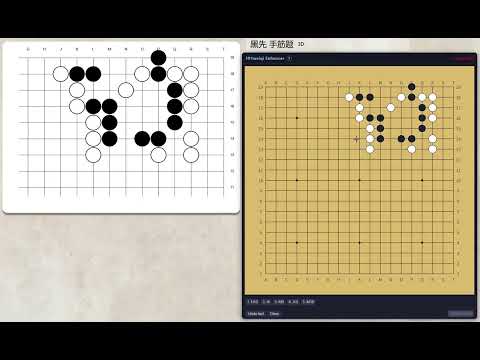
****** Changelog 06/10/2026 - V1.0.0 - Increase the size of the mini-board, copy the stones from main answer board to mini-board 06/11/2026 - V1.0.1 - Bug fixing: problem with move in the same spot in answer chain ****** A Chrome MV3 extension for https://www.101weiqi.com/task/* Go (Weiqi) puzzle pages. It adds a draggable practice panel that forces the player to think through the whole sequence (both sides' moves) before touching the real board. Core Functionalities 1. Floating practice panel A draggable panel (drag via header) is injected into every task page, containing a mini Go board, a move list, and action buttons. 2. Mini-board for planning moves Renders a scaled-down SVG board matching the real puzzle's size (9×9, 13×13, or 19×19, read from qqdata.lu) Includes grid lines, star points (hoshi), and coordinate labels (A–T columns skipping I, numbered rows) Clicking an intersection places a numbered stone (1, 2, 3, …), alternating black/white by move parity Re-clicking an occupied point replaces the marker but is recorded as a new step Moves are listed below the board (e.g. 1. K10, 2. L11) "Undo last" removes the most recent move; "Clear" wipes all moves and resets state 3. Answer checking ("Submit") Compares the user's full move sequence against the puzzle's correct-answer chains (parsed from qqdata.answers, encoded in the site's a–s coordinate system) Requires at least 2 moves unless a correct answer is itself a single move Shows a verdict badge in the panel header: Perfect! (green) — exact full-sequence match Almost There! (yellow) — correct so far but incomplete Incorrect! (red) — wrong sequence Answer Too Short! (red) — not enough moves submitted 4. Submit cooldown After an "Incorrect" verdict, the Submit button is disabled and shows a 30-second countdown (Submit (30s) → Submit (1s)), discouraging rapid blind guessing. Cooldown resets when a new task loads. 5. Main-board lock The real 101weiqi game board (#qipan) is locked (pointer-events: none, via a wep-board-locked body class) until the user achieves a "Perfect!" result on the mini-board — preventing the user from clicking ahead on the actual board before working out the answer themselves. A self-check (verifyBoardLock) reloads the page once if the lock fails to apply. 6. Built-in help tooltip A "?" icon next to the panel title shows a hover/focus tooltip explaining the four rules above. 7. Navigation handling (上一题 / 下一题) Clicking "Previous"/"Next" buttons is intercepted; the extension computes the adjacent task URL by incrementing/decrementing the index segment of the current task URL (/task/{pageid}/{tkid}/{index}/) and performs a hard page reload — ensuring the panel, mini-board, and lock state are freshly reset for each puzzle. 8. Fresh state per page load No persistent storage — moves, lock state, and cooldown are always reset when a task page loads or changes, so each puzzle starts clean.
0 out of 5No ratings
Details
- Version1.0.1
- UpdatedJune 12, 2026
- Size12.84KiB
- LanguagesEnglish
- Developer
Email
blacknight1982@gmail.com - Non-traderThis developer has not identified itself as a trader. For consumers in the European Union, please note that consumer rights do not apply to contracts between you and this developer.
Privacy

This developer declares that your data is
- Not being sold to third parties, outside of the approved use cases
- Not being used or transferred for purposes that are unrelated to the item's core functionality
- Not being used or transferred to determine creditworthiness or for lending purposes