

🧠 Recallio – Smart Web Highlighter

Overview
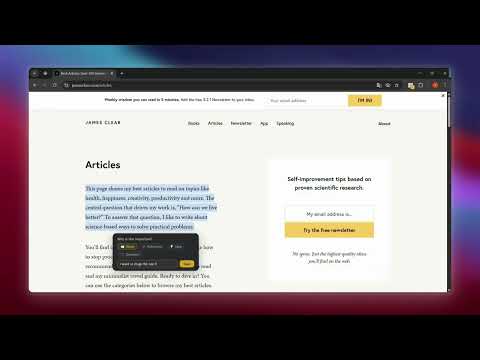
Highlight text, add notes, and review them with smart recall to remember what you read.
Most highlights are forgotten within days—don’t let yours vanish. Recallio turns your browsing into structured knowledge you can actually remember. Highlight text on any website, organize your notes by purpose, and review them later with Smart Recall. Why it works: 🔹 Capture any text instantly, on any site 🔹 Categorize highlights: Study, Idea, Question, Reference 🔹 Add personal notes for context or insights 🔹 Search, filter, and jump to your saved highlights anytime 🔹 Review highlights with Smart Recall mode—test yourself, see examples, and strengthen memory 🔹 Decide what to keep, revisit, or remove Perfect for: Students • Researchers • Developers • Writers • Lifelong learners Stop saving random highlights. Start building knowledge you remember—and actually use.
0 out of 5No ratings
Details
- Version1.2.0
- UpdatedMarch 6, 2026
- Offered byThomas
- Size55.11KiB
- LanguagesEnglish (United States)
- DeveloperTHOMAS YASSER NASRALLH AZER
18 Street 10 El Marg, Cairo Governorate 4630217 EGEmail
thomasyasser197@gmail.com - Non-traderThis developer has not identified itself as a trader. For consumers in the European Union, please note that consumer rights do not apply to contracts between you and this developer.
Privacy

This developer declares that your data is
- Not being sold to third parties, outside of the approved use cases
- Not being used or transferred for purposes that are unrelated to the item's core functionality
- Not being used or transferred to determine creditworthiness or for lending purposes