Item logo image for 🚛 Semi: Secure Testing Wrapper

🚛 Semi: Secure Testing Wrapper

cmgarza.com
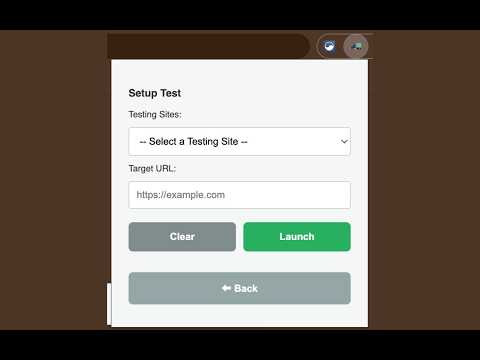
Item media 4 (screenshot) for 🚛 Semi: Secure Testing Wrapper
Item video thumbnail
Item media 2 (screenshot) for 🚛 Semi: Secure Testing Wrapper
Item media 3 (screenshot) for 🚛 Semi: Secure Testing Wrapper
Item media 4 (screenshot) for 🚛 Semi: Secure Testing Wrapper
Item video thumbnail
Item media 2 (screenshot) for 🚛 Semi: Secure Testing Wrapper
Item media 3 (screenshot) for 🚛 Semi: Secure Testing Wrapper
Item media 4 (screenshot) for 🚛 Semi: Secure Testing Wrapper

Overview

Semi is a deterrent-focused testing environment where system-level kiosk mode is inaccessible or restricted.

Semi is a lightweight, deterrent-focused testing environment designed for environments where system-level kiosk mode is inaccessible or restricted. It isolates a single testing tab into a dedicated, fullscreen popup window while programmatically terminating all other active browser distractions. While it operates within the standard user-space (avoiding the instability of Incognito mode on managed devices), it provides a robust defense against common integrity breaches by disabling the context menu, blocking clipboard actions (Copy/Paste/Cut), and intercepting navigation shortcuts. It serves as a high-friction deterrent that creates a focused, single-purpose testing shell. What it does: Isolates: Closes all other tabs and windows to ensure the student is only on the assigned test. Focuses: Launches the test in a fullscreen 'Popup' mode, removing the address bar and bookmarks. Defends: Hard-blocks Right-Click and Ctrl+C/V to prevent the external sharing of test content. Note on Security: This is a browser-level deterrent. It does not lock the operating system (Alt+Tab and the Windows key remain active). It is designed to be a portable, low-friction tool for classroom management.

Details

  • Version
    1.0
  • Updated
    March 14, 2026
  • Size
    198KiB
  • Languages
    English
  • Developer
    Carlos O Garza
    PO Box 4013 Edinburg, TX 78540 United States
    Website
    Email
    CWS@eduGOOGdroid.com
  • Non-trader
    This developer has not identified itself as a trader. For consumers in the European Union, please note that consumer rights do not apply to contracts between you and this developer.

Privacy

Manage extensions and learn how they're being used in your organization
The developer has disclosed that it will not collect or use your data. To learn more, see the developer’s privacy policy.

This developer declares that your data is

  • Not being sold to third parties, outside of the approved use cases
  • Not being used or transferred for purposes that are unrelated to the item's core functionality
  • Not being used or transferred to determine creditworthiness or for lending purposes

Support

Related

DOM XSS Highlighter — Pro

0.0

Highlights user-controlled reflections in DOM to help detect risky contexts. Run only on sites you own or may test.

Impulse – Website Blocker, Screen Time & Focus Control

4.6

Block distractions, set smart limits, and control impulsive browsing with focus tools designed to stop quick overrides and cheating.

StayFocus on Canvas

2.3

Prevents Canvas from detecting tab switching during quizzes or exams, maintaining focus on the Canvas page.

Focus Guard

5.0

Focus Guard reminds you to focus when you try to access distracting websites by redirecting you to the Focus page.

Focus Tab Locker

5.0

Stay focused by locking into one tab. Prevents tab switching and new tabs.

Mouse Block

0.0

Prevents use of a mouse or touchpad, to encourage testing keyboard navigation.

axibly.ai

0.0

Comprehensive accessibility testing for web applications

Exam Room - Block website during exam

5.0

Activate an exam environment and block/allow specific websites

CORS Unblocker

5.0

Temporarily bypass CORS restrictions to streamline development and testing workflows.

Nuqta Site Blocker

5.0

Smart website blocker with focus modes and beautiful interface

Porn / Adult Blocker, Block Sites - XShield

5.0

Powerful extension designed to safeguard your browsing experience by blocking access to explicit or inappropriate content.

MasteryConnect LockDown Browser

1.5

LockDown Browser is a custom browser that locks down the exam environment within specific learning and assessment systems

DOM XSS Highlighter — Pro

0.0

Highlights user-controlled reflections in DOM to help detect risky contexts. Run only on sites you own or may test.

Impulse – Website Blocker, Screen Time & Focus Control

4.6

Block distractions, set smart limits, and control impulsive browsing with focus tools designed to stop quick overrides and cheating.

StayFocus on Canvas

2.3

Prevents Canvas from detecting tab switching during quizzes or exams, maintaining focus on the Canvas page.

Focus Guard

5.0

Focus Guard reminds you to focus when you try to access distracting websites by redirecting you to the Focus page.

Focus Tab Locker

5.0

Stay focused by locking into one tab. Prevents tab switching and new tabs.

Mouse Block

0.0

Prevents use of a mouse or touchpad, to encourage testing keyboard navigation.

axibly.ai

0.0

Comprehensive accessibility testing for web applications

Exam Room - Block website during exam

5.0

Activate an exam environment and block/allow specific websites

Google apps