


Overview
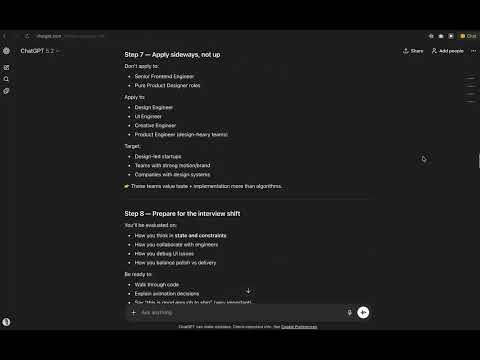
Navigate long ChatGPT conversations by your prompts. Runs locally. No data leaves your browser.
What it does: 📍 Automatically creates anchors for your prompts inside each chat, ⚡️ Jump to any prompt in your chat history, 👁️ Hover to preview a prompt, 🔄 Updates live as the conversation grows. Designed for long sessions, deep thinking, and power users. 🔒 Privacy-first by design Prompt Anchors runs entirely in your browser. ✅ No message content is read or stored ✅ No tracking ✅ No data collection ✅ No servers ✅ No accounts The extension only detects message positions in the page to enable navigation. Your conversations stay yours. 🎯 Who it’s for Designers & engineers working through complex problems, Researchers & writers having long conversations, Anyone who treats ChatGPT like a workspace, not a chatbot, If you scroll a lot — this is for you. 🧩 How it works Detects your prompts in the chat, Builds a lightweight navigation rail on the top-right, Scrolls smoothly to the selected message, That’s it. ⚙️ Lightweight & unobtrusive Minimal UI, No performance impact, Works automatically on ChatGPT. 🛠️ Permissions Prompt Anchors requires access only to ChatGPT pages to inject navigation UI, No external requests are made. 📌 Notes Currently anchors are created only for your messages, The extension adapts automatically to ChatGPT interface updates, Works best with long conversations.
0 out of 5No ratings
Details
- Version1.2.0
- UpdatedJanuary 23, 2026
- Size15.16KiB
- LanguagesEnglish
- DeveloperWebsite
Email
serezhaok@gmail.com - Non-traderThis developer has not identified itself as a trader. For consumers in the European Union, please note that consumer rights do not apply to contracts between you and this developer.
Privacy

This developer declares that your data is
- Not being sold to third parties, outside of the approved use cases
- Not being used or transferred for purposes that are unrelated to the item's core functionality
- Not being used or transferred to determine creditworthiness or for lending purposes
Support
For help with questions, suggestions, or problems, please open this page on your desktop browser