

🍌 BananaX

Overview
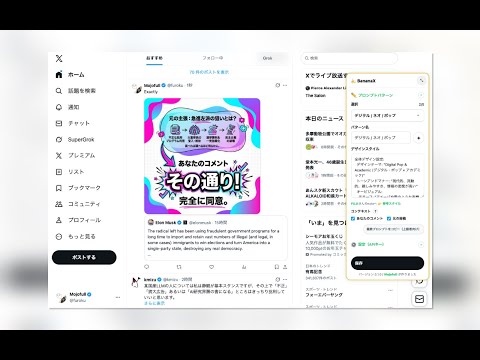
Generate infographic images from X post text and context, then attach them to the composer.
🍌 BananaX turns your X (Twitter) posts and threads into publication-ready infographics in one click—directly inside the X post composer. ■ Key Capabilities • 1-Click Infographic Generation: Reads your draft post (plus reply/quote context) and generates structured visual summaries. • Dual AI Engine Support: Switch seamlessly between Google "🍌 Gemini Nano Banana 2.1" and OpenAI "⚡ GPT Image 2.6 Flare" right from the X composer popover. • 5 Curated Visual Styles & Parallel Generation: 1. 📊 Smart Infographic 2. ⚡ Pop & Catchy 3. 🖤 Cool Editorial 4. ☕ Cozy Sketch & Zine 5. 🏙️ Isometric World Map Generate a single style or run up to 5 patterns in parallel and pick your favorite in the preview gallery. ■ 8 Creator Pro Workflow Features 1. ⚡ 1-Click Quick Tweak Presets: Refine any generated card instantly with 6 preset chips ("🔍 Larger Text", "🧹 Simplify", "☀️ Brighter BG", "🎨 High Contrast", "🇯🇵 Natural Text", "📐 Clean Layout"). 2. ⏪ Before / After Undo Toggle: Compare your tweaked image against the original in one click without losing either version. 3. 📋 1-Click Copy PNG to Clipboard: Paste generated infographics straight into Notion, Slack, Substack, or slides via Cmd+V / Ctrl+V. 4. 🏷️ Auto-Watermark Credit Stamp (@handle): Automatically composite a clean bottom-right credit pill onto your images when attaching, saving, or copying. 5. 🎨 Brand Color Palette Lock: Choose from 5 curated brand palettes (X Blue, Note Green, Mono & Gold, Coral & Mint, Indigo & Pink) or lock your own Primary/Accent hex colors and background tone. 6. 🔤 Auto-ALT Text Generator & Copy: Generate structured, accessible image descriptions (up to 980 chars) and copy them in 1 click for X's "+ALT" dialog. 7. 📐 X Timeline Aspect Ratio Purpose Badges: Pick the ideal canvas with built-in X feed badges (3:4 Max Mobile TL, 16:9 X Standard Card, 1:1 Universal Square, 4:3 4-Image Grid). 8. 🖼️ Reference Image Lock (Character / Style / Logo), 🕘 20-Item Local History Gallery, and 💾 1-Click JSON Settings Backup (with API keys automatically stripped). ■ Privacy & Security (Bring Your Own Key) • Uses your own Google Gemini API key or OpenAI API key. • All keys, preferences, and history stay locally in your browser (chrome.storage) and are only sent directly to the official AI provider you select.
0 out of 5No ratings
Details
- Version26.1117.2110
- UpdatedNovember 17, 2026
- Offered byMojofull
- Size142KiB
- Languages4 languages
- Developer甲斐 大樹
千駄ヶ谷4-9-24 104号室 渋谷区, 東京都 1510051 JPEmail
mojofull.furoku@gmail.comPhone
+81 90-2431-0789 - TraderThis developer has identified itself as a trader per the definition from the European Union and committed to only offer products or services that comply with EU laws.
Privacy

🍌 BananaX has disclosed the following information regarding the collection and usage of your data. More detailed information can be found in the developer's privacy policy.
🍌 BananaX handles the following:
This developer declares that your data is
- Not being sold to third parties, outside of the approved use cases
- Not being used or transferred for purposes that are unrelated to the item's core functionality
- Not being used or transferred to determine creditworthiness or for lending purposes
Support
For help with questions, suggestions, or problems, please open this page on your desktop browser