

하이러닝 도우미
5.0(
1 rating
)ExtensionEducation193 users

Overview
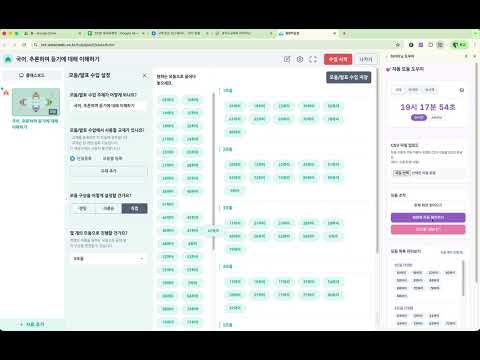
하이러닝 통합학습창의 모둠 구성을 CSV를 통해 자동으로 배치하고 저장하는 도우미입니다. 시계, 타이머, 초시계 기능도 함께 제공합니다.
🎯 하이러닝 도우미 교사를 위한 하이러닝(통합학습창) 모둠 자동 배치 및 수업 도우미 확장프로그램입니다. 📋 주요 기능 • CSV 파일로 학생 모둠 구성을 한 번에 자동 배치 • 현재 화면의 모둠 정보를 읽어오기 및 CSV로 내보내기 • 실시간 시계, 카운트다운 타이머, 초시계 (팝업 지원) 🔧 사용 방법 1. 하이러닝 통합학습창에 접속합니다. 2. 확장프로그램 아이콘을 클릭하면 사이드바가 열립니다. 3. CSV 파일(모둠, 학생 이름)을 업로드하거나 화면을 읽어옵니다. 4. "화면에 자동 배치하기" 버튼을 눌러 모둠을 자동 구성합니다. ⏰ 시간 도구 • 시계/타이머/초시계를 탭으로 전환하여 사용 • 팝업 버튼(↗️)으로 별도 창에서 크게 표시 가능 🔒 권한 안내 • 하이러닝 사이트(nct.ontactedu.co.kr, hi.goe.go.kr)에서만 동작합니다. • 개인정보를 수집하거나 외부로 전송하지 않습니다.
5 out of 51 rating
Details
- Version1.0
- UpdatedMarch 11, 2026
- Offered byTechKwon
- Size39.46KiB
- Languages한국어
- Developer호원중학교
호암로 205 의정부시, 경기도 11639 KREmail
tk@techkwon.kr - Non-traderThis developer has not identified itself as a trader. For consumers in the European Union, please note that consumer rights do not apply to contracts between you and this developer.
Privacy

Manage extensions and learn how they're being used in your organization
The developer has disclosed that it will not collect or use your data. To learn more, see the developer’s privacy policy.
This developer declares that your data is
- Not being sold to third parties, outside of the approved use cases
- Not being used or transferred for purposes that are unrelated to the item's core functionality
- Not being used or transferred to determine creditworthiness or for lending purposes
Support
For help with questions, suggestions, or problems, please open this page on your desktop browser