


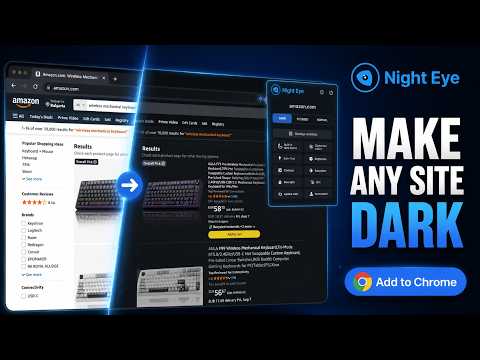
Overview
Dark mode for websites with brightness, contrast, warmth, scheduling, and PDF support. No ads. Customize each site separately.
Night Eye is a dark mode extension for Chrome that transforms bright websites into comfortable, customizable dark themes for browsing, reading, working, and studying. It is built for websites that do not provide a suitable dark theme and for users who want more control over how websites look at night or in low-light environments. Instead of simply inverting every color, Night Eye analyzes page elements and adjusts bright backgrounds, text, icons, and interface components while preserving important photos, videos, and other large media. Websites stay recognizable and usable while bright interfaces become easier to view. Night Eye is used by over 1M+ across major browsers and has been actively maintained since 2018. WHY USE NIGHT EYE • Use dark mode on websites that do not provide their own dark theme • Adjust brightness, contrast, saturation, warmth, and dim levels • Reduce blue light by increasing warmth for evening browsing • Schedule Night Eye to turn on and off automatically • Apply a darker appearance to supported PDFs opened in Chrome • Work with supported websites that already include built-in dark themes • Follow your operating system or browser color scheme • Apply global settings or customize individual websites • Choose where Night Eye is active with allow and disallow controls • Apply preferences by website and supported subdomains • Import and export settings between browsers • Add custom CSS for advanced website-specific adjustments • No ads • Night Eye does not collect or sell your user data AVAILABLE MODES DARK MODE Converts website colors, text, backgrounds, icons, and small interface elements into a darker theme. Use it when a website is too bright or does not offer a suitable dark appearance of its own. FILTERED MODE Keeps the website's original colors while allowing you to adjust brightness, contrast, saturation, warmth, dimming, and other visual settings. This is useful when you want to reduce screen intensity without fully changing the original design. NORMAL MODE Turns Night Eye off for the current website and restores its original appearance. CUSTOMIZE EACH WEBSITE Night Eye lets you control how websites look instead of forcing the same settings everywhere. Apply your preferred settings globally, then change individual sites when a different brightness, contrast, warmth, saturation, or dim level works better. You can also decide which websites should use Night Eye and which should remain unchanged. Domain and supported subdomain controls make it easier to keep different preferences for different parts of the web. IMAGES, VIDEO, AND MEDIA Night Eye focuses its transformation on page backgrounds, text, controls, icons, and smaller visual elements. Larger media such as photos, videos, and social media content is preserved so important visual content is not unnecessarily recolored. BRIGHTNESS, CONTRAST, AND SATURATION Adjust the visual intensity of a website to fit your display, room lighting, and personal preference. These controls can be applied globally or configured for individual websites. BLUE LIGHT / WARMTH Increase warmth to reduce cold-looking screen light during evening or late-night browsing. You control the intensity and can combine warmth with brightness, contrast, saturation, and dim settings. DIM Lower the overall visual brightness of a page when browsing in a dark room or when a website still feels too bright after its colors have been transformed. SCHEDULING AND SYSTEM COLOR SCHEME Night Eye can follow a schedule so the darker appearance turns on and off automatically. It can also integrate with your operating system or browser color scheme, helping websites follow the light or dark appearance you already use on your device. PDF DARK MODE Night Eye can transform supported PDFs opened in Chrome, making long documents more comfortable to view against a darker background. This is useful when moving between websites and PDF documents during reading, research, or work. BUILT-IN DARK THEME CONTROL Some websites already provide their own dark themes. Night Eye can work with supported built-in themes, giving you easier control from one place instead of managing every compatible site separately. CUSTOM CSS For websites that need additional adjustments, Night Eye includes custom CSS support. This gives advanced users another way to fine-tune individual websites when the standard visual controls are not enough. PRICING Night Eye Lite is the forever-free version of Night Eye. It allows a darker browsing experience on up to 5 websites of your choice, with no ads and no hidden charges. New users can try Night Eye Pro for 3 months with no credit card required. Paid plans are available for users who want more websites and additional usage options: • Night Eye Pro • Night Eye Pro Max • Night Eye Ultimate — one-time purchase option For the latest pricing and plan details, visit: https://nighteye.app/how-to-start/ PRIVACY Night Eye needs permission to read and change website content because that permission is required to detect page colors and modify the appearance of the websites you visit. Website color transformation is performed locally in the extension. Night Eye does not sell your data and does not use third-party analytics such as Google Analytics inside the extension. Your visual preferences — including website-specific settings for brightness, contrast, saturation, warmth, dim level, and related appearance controls — are stored locally on your device so Night Eye can remember how you want each website to look. For more information, see our privacy policy: https://nighteye.app/privacy-policy/ SUPPORT If a website does not look right, contact the Night Eye support team for help. Built-in support is available for website-specific display issues. You can also follow product updates and release notes here: https://nighteye.app
4.6 out of 53.3K ratings
Details
- Version6.1.1
- UpdatedAugust 27, 2026
- FeaturesOffers in-app purchases
- Size1.19MiB
- Languages51 languages
- DeveloperPROMOTINO OODWebsite
Mladost 1 A Distr., bl.No 537, fl. 1, apt. 2A Sofia 1729 BGEmail
extensions@promotino.comPhone
+359 88 684 8570 - TraderThis developer has identified itself as a trader per the definition from the European Union and committed to only offer products or services that comply with EU laws.
- D-U-N-S507439675
Privacy

Dark Mode - Night Eye has disclosed the following information regarding the collection and usage of your data. More detailed information can be found in the developer's privacy policy.
Dark Mode - Night Eye handles the following:
This developer declares that your data is
- Not being sold to third parties, outside of the approved use cases
- Not being used or transferred for purposes that are unrelated to the item's core functionality
- Not being used or transferred to determine creditworthiness or for lending purposes
Support
For help with questions, suggestions, or problems, please open this page on your desktop browser