


Overview
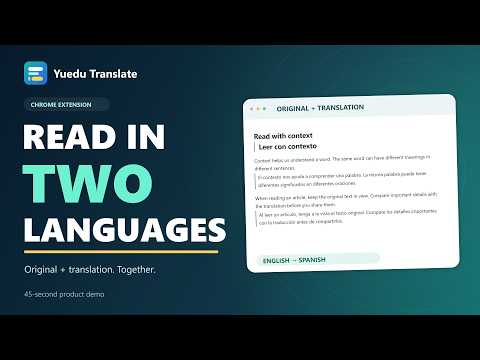
The original stays in view, understanding stays close. Yuedu puts the translation under every paragraph so you can check articles…
Yuedu Translate: read foreign-language web pages side by side with the original. Yuedu places a translation under each paragraph. No switching tabs: when a sentence is unclear, the original is right there. FEATURES • Side by side: each translation follows its paragraph in the same style, marked by a thin line. • Whole page: headings and body text, plus menus, tabs, buttons and form labels, all get a translation; short ones sit on the same line as the original so layouts stay intact. Code blocks are left alone. • Translated as you scroll: only paragraphs you are about to read are translated, so long articles open instantly. • One-click restore: “Show original” puts the page back exactly as it was. • Retry what failed: a failed paragraph shows a “Retry” button; the rest of the page keeps working. • Bilingual or translation only: the switch beside the “Translate” button flips between the two views at once, without translating again. • Your way: adjust font size, colour, spacing and the marker line, or turn Yuedu off for specific sites. • Automatic on the sites you choose: add a site to the automatic list and its pages translate as they open, unless the page already is in your target language. Each site is permitted individually and can be removed at any time. • Look up a selection: select text and rest the pointer on the “Look up” button to see its translation, typed out as it appears. For a single word, the phonetics, common senses and what it means in that sentence are a paid VIP feature; free accounts see the translation. • Read aloud: after translating, press “Read translation aloud” to be read to from the paragraph on screen. Only the article's title and body are read, not menus, sidebars or links; the page scrolls along and newly translated text is read as it arrives, up to the end of the current article, and you can stop at any time. The browser's own natural voice (such as Edge's) is used first, on your device. Without one (such as in Chrome), signing in lets you use the server's neural voice instead: the short piece being read is then sent to the server to produce the audio, and the server stores neither the text nor the audio. On an error or when the allowance is used up, it falls back to the voice on your device. • Video subtitles: with captions turned on, the translation appears under the original line. The original and its translation move together, so you can drag the pair anywhere on the picture and it stays there. Their text and background colour are set in Settings. Captions, including automatic ones, are translated ahead using their own timecodes where the player allows it (YouTube), so both lines appear together, and the player’s own caption is hidden so the original is not shown twice. • Translate what you type: after typing in any text box, press space three times (or Alt+Enter) and your text is replaced with its translation; Ctrl+Z undoes it. Off by default, and only the text at that moment is sent. • Several translation services: free Google Translate by default; signed in, you can choose other services, including large-model translation. VIP is a paid subscription (yearly or monthly, purchased on our website). • Own key: enter the address and key of your own OpenAI-compatible service (OpenAI, DeepSeek, or Ollama on your own machine) and translation, word lookup and reading aloud all use it instead; nothing goes through Yuedu's servers or counts against any Yuedu quota. • Word book: star a word while looking it up to save it, with spaced-repetition review reminders and export to Anki; kept on this device only. • Glossary: pin a fixed translation for a word, used on every page, with higher priority than automatic detection; kept on this device only. • More reliable translation: when the chosen service errs, is rate-limited, or answers oddly, it is automatically retried with another free service, so one failure doesn't stall the page; translations are cached on this device, so reopening the same page is faster. LANGUAGES Translate into: 45 languages, including Simplified and Traditional Chinese, Cantonese (colloquial, read aloud with a Cantonese voice), English, Japanese, Korean, Spanish, French, German, Russian and Arabic. The list is grouped by region and searchable; Arabic, Hebrew and the like are shown right to left. Interface: 简体中文, 繁體中文, English, 日本語, Tiếng Việt, Bahasa Melayu, العربية — follows your browser by default. HOW TO USE Open a foreign-language page, then click the Yuedu icon and press “Translate”, press Alt+Y, or use the right-click menu. TRANSLATION SERVICE AND PRIVACY By default Yuedu uses Google Translate (free): paragraphs to translate are sent from your browser directly to Google, never through a Yuedu server, so Google must be reachable on your network. The endpoint is unofficial and may be rate-limited or stop working. Signing in to a Yuedu account is optional (on the Yuedu website, with an email code or a Google account). Signed in, you can use other translation services, and purchase the paid VIP service (yearly or monthly). For these, the paragraphs to translate are sent to the Yuedu server and passed on to the provider; the server stores only your email address, plan and usage totals — never page text, translations or reading-aloud audio — and the account can be deleted from the options page at any time. Without signing in, only the free Google service above is used. Reading aloud uses your browser's own voice on your device by default. If your browser has no natural voice (Chrome, for example) and you are signed in, the short piece being read (at most 500 characters at a time) is sent to the Yuedu server and on to a third-party speech service to produce the audio (see the privacy policy), and is not stored. Browsers with a natural voice of their own, such as Edge, send nothing. Yuedu never reads or uploads URLs, cookies, passwords or form input, and settings stay in your browser. Automatic translation applies only to sites you add yourself and permit individually. See the privacy policy for details.
Details
- Version0.4.31
- UpdatedNovember 14, 2026
- Size309KiB
- Languages7 languages
- DeveloperWebsite
Email
support@getyuedu.com - Non-traderThis developer has not identified itself as a trader. For consumers in the European Union, please note that consumer rights do not apply to contracts between you and this developer.
Privacy

Yuedu Translate has disclosed the following information regarding the collection and usage of your data. More detailed information can be found in the developer's privacy policy.
Yuedu Translate handles the following:
This developer declares that your data is
- Not being sold to third parties, outside of the approved use cases
- Not being used or transferred for purposes that are unrelated to the item's core functionality
- Not being used or transferred to determine creditworthiness or for lending purposes
Support
For help with questions, suggestions, or problems, visit the developer's support site


