

Voice Master: Voice Recognition and Speech-to-Text Converter

Overview
Enables speech (voice) recognition and its conversion into text, with the insertion of this text into the page's text elements
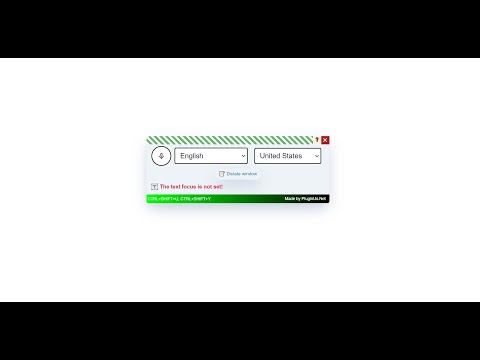
"Voice Master" is a free Chrome browser extension that offers speech recognition (voice-to-text) capabilities. It converts spoken words into text, which can be automatically inserted into any text field on a webpage or a dedicated dictation window. This makes it easy to interact with AI platforms like ChatGPT, Gemini, Claude, and DeepSeek using just your voice. Additionally, the extension includes AI-powered text correction (punctuation, formatting, vocabulary and even fixing misrecognized words by context) — you can connect your own API key from OpenAI, Anthropic (Claude) or DeepSeek to unlock it. No key is required for everyday dictation: the extension is fully functional and free without one. Ideal for boosting productivity, "Voice Master" helps save time on typing and streamlines your workflow. ➤ Installation and Setup Install the "Voice Master" extension as you would any other Chrome extension. After installation, you will see a microphone icon, which we recommend dragging onto the toolbar for quicker access. ➤ Usage Activate Voice Input: In the pop-up window, switch the toggle to "on," and click on the microphone icon. Language Selection: Choose your desired input language, whether it be English or any other available language. Field Selection: Select the input field on the web page where you wish to leave your text – it could be a shop-site search bar, YouTube comment section, Facebook post textarea, WordPress TinyMCE text editor, or any other text field. Dictation text area: Click on the special button "Dictate window," start speaking, and "Voice Master" will transcribe your speech into text. Use it to verbalize your thoughts. Voice Input Deactivation: Once done speaking, click on the microphone icon again to stop the process, or use the hotkey CTRL+SHIFT+Y. ➤ AI Text Improvement (OpenAI / Claude / DeepSeek — optional) The built-in Chrome speech engine is free, but not the most accurate: it can miss punctuation or even insert a wrong word that sounds similar. "Voice Master" can pass your dictated text through a modern AI model, which corrects spelling, punctuation, style — and replaces misrecognized words with what you most likely meant, judging by the context. Open settings (the ⚙️ gear on the panel), choose your AI provider — OpenAI (ChatGPT), Anthropic (Claude) or DeepSeek — and paste your API key. Improve on demand: in the dictate window, press "✨ Improve current text" and the whole text is corrected in place (Ctrl+Z restores the original). NEW — Improve on the fly: enable the checkbox in settings, and every dictated phrase is sent to the AI and inserted already corrected. Phrases are processed strictly in the order you spoke them, and your text is never lost: if the AI is unavailable, the original text is inserted instead. The preview panel shows a live status ("text is being processed by AI…") so you always know what is happening. Recommended for long dictations. Without a key everything works as usual — the AI features simply stay inactive, and the settings clearly explain this. !! You pay your AI provider directly — no intermediaries, no extra service fees. Modern budget models (GPT-4o mini, Gemini flash, Claude Haiku, DeepSeek) cost fractions of a cent per correction, so even a $5 balance is enough to polish enormous amounts of text. !! ➤ Your API Keys Are Safe Keys are stored only on your computer, in encrypted form (AES-GCM), and are sent nowhere except your chosen AI provider. Web pages can never read your keys: the extension never exposes them to any site. The settings never display the key itself — only a masked hint (sk-…ab12). You can delete the key at any moment with one click, and nothing is saved until you press Save. ➤ Functionality Disclaimer Limitations of Speech Recognition APIs: Although speech recognition technologies have significantly improved, they still may struggle with accurately identifying punctuation. This is because punctuation marks are not spoken as words, and must be inferred from intonation, pauses, and the rhythm of speech, which can be challenging for algorithms. Complexity of Speech Models: Human speech can be unpredictable and varied. People may speak quickly, merge words, use regional features, or articulate sounds unclearly. All these factors pose challenges for the speech recognition system in accurately recognizing words and applying punctuation. Need for Contextual Understanding: Punctuation and word choice often depend on the context of a sentence or even a paragraph. AI models such as ChatGPT, Claude and DeepSeek are trained on large volumes of text and can better determine the right words, commas, periods, question marks, and exclamation points based on context. Brief Explanation for Inclusion in Texts: "To enhance the accuracy of texts recognized by Speech-to-Text technologies, we apply additional correction using AI. This allows for consideration of the context and nuances of human speech, ensuring high precision in text formatting." Notes: AI correction does not work for the YouTube comments section. On-the-fly improvement adds a short delay (1–3 seconds per phrase) — that is the price of accuracy; the status message on the panel keeps you informed. ➤ Dictation in a Separate Window For more convenient text management, use the dictate in a separate window feature: Press the "Dictate window" button. Dictate your text, and it will appear in a separate field, from where you can copy it anywhere or use it for personal notes. Press "✨ Improve current text" to polish the whole text with your chosen AI provider right in this window (works great together with on-the-fly improvement, or on its own). Example of using: dictate an email to anybody and correct the text using AI. ➤ Additional Features All windows and panels of the plugin are draggable. Hotkeys: To toggle the panel visibility, use the hotkey: CTRL+SHIFT+U. When using any textarea or text input, you can enable or disable speech recognition with the hotkey: CTRL+SHIFT+Y. If you select text and then speak, the selected text will be replaced with what you have spoken. Settings changes apply instantly in all open tabs. The interface is translated into 17 languages. Additionally, you can close the window or change the language settings at any time. ➤ Feedback and Suggestions If you have any ideas or suggestions, please contact us through contact form on https://pluginus.net/contact-us. We value your input and are always looking to improve "Voice Master" to better suit your needs. ➤ Conclusion "Voice Master" is a handy tool that helps you translate voice to text. With it, you can easily control the Internet with your voice, turn speech into text on command, and, if necessary, correct the text using artificial intelligence — instantly, as you speak, or afterwards with one click. This tool makes using the Internet easier and does not require much effort to manage. Add "Voice Master" to your daily routine to make texting easier with advanced speech recognition technology.
3.2 out of 58 ratings
Details
- Version1.0.7
- UpdatedJuly 17, 2026
- Size91.47KiB
- Languages17 languages
- Developer
- Non-traderThis developer has not identified itself as a trader. For consumers in the European Union, please note that consumer rights do not apply to contracts between you and this developer.
Privacy

This developer declares that your data is
- Not being sold to third parties, outside of the approved use cases
- Not being used or transferred for purposes that are unrelated to the item's core functionality
- Not being used or transferred to determine creditworthiness or for lending purposes
Support
For help with questions, suggestions, or problems, please open this page on your desktop browser