

注音校正編輯器
5.0(
5 ratings
)ExtensionEducation831 users

Overview
提供使用者進行破音字校正編輯的工具插件
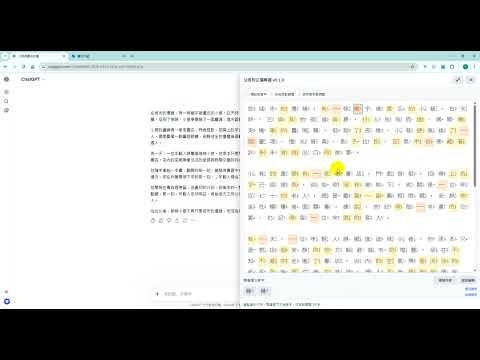
***************更新紀錄*************** 2026/04/09 增加 AI 注音校正,可大幅提高校正正確率約97% ***************功能說明*************** 讓注音校正更快、更直覺 「注音校正編輯器」是一款可直接覆蓋在網頁右側的注音校正工具。 你可以貼上或輸入中文內容,一鍵轉換到注音校正模式,系統會先依規則由AI自動判讀破音字,再由你手動微調,最後一鍵複製結果。 主要功能 右側抽屜式面板,不擠壓原網頁內容 一鍵「開始校正注音」,快速切換到結果頁 破音字自動判讀(依 context pattern 規則) 破音字手動選字,逐字修正更精準 視覺化標記: 預設破音字 系統自動調整 使用者手動調整 一鍵複製目前校正後純文字 內建「開發團隊」「版權聲明」單頁資訊 支援快捷鍵快速開啟與校正 使用方式 點擊工具列圖示,開啟右側注音校正面板 在編輯區輸入或貼上文字 按「開始校正注音」 點選字詞並在下方選擇候選破音字 按「複製全部」取得最終文字 快捷鍵 Alt + Shift + E:開啟右側注音編輯器 Alt + Shift + Z:校正目前聚焦輸入欄位內容
5 out of 55 ratings
Details
- Version0.1.2
- UpdatedApril 9, 2026
- Offered byshengguow
- Size6.06MiB
- Languages中文(台灣)
- Developer杰果資訊有限公司
重慶路308巷14號 板橋區, 新北市 220 TWEmail
shengguow@gmail.comPhone
+886 937 789 371 - TraderThis developer has identified itself as a trader per the definition from the European Union and committed to only offer products or services that comply with EU laws.
- D-U-N-S964014259
Privacy

Manage extensions and learn how they're being used in your organization
The developer has disclosed that it will not collect or use your data. To learn more, see the developer’s privacy policy.
This developer declares that your data is
- Not being sold to third parties, outside of the approved use cases
- Not being used or transferred for purposes that are unrelated to the item's core functionality
- Not being used or transferred to determine creditworthiness or for lending purposes