Item logo image for DeskScape Player

DeskScape Player

5.0(

3 ratings

)
Item media 6 (screenshot) for DeskScape Player
Item video thumbnail
Item media 2 (screenshot) for DeskScape Player
Item media 3 (screenshot) for DeskScape Player
Item media 4 (screenshot) for DeskScape Player
Item media 5 (screenshot) for DeskScape Player
Item media 6 (screenshot) for DeskScape Player
Item video thumbnail
Item media 2 (screenshot) for DeskScape Player
Item media 3 (screenshot) for DeskScape Player
Item media 4 (screenshot) for DeskScape Player
Item media 5 (screenshot) for DeskScape Player
Item media 6 (screenshot) for DeskScape Player

Overview

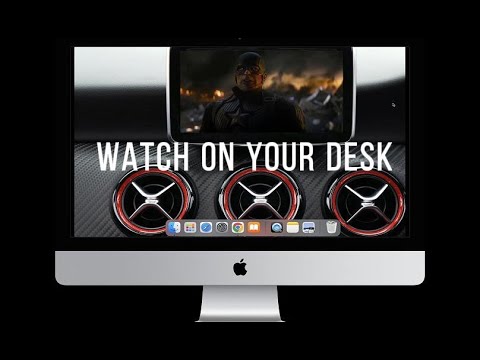
Turn your desktop into a dynamic scene by placing any YouTube video inside your wallpaper's TV.

Tired of your static desktop? Struggling to multitask between a video tutorial and your work due to limited screen space? DeskScape TV is the solution. It's more than a simple Picture-in-Picture (PiP) tool; it's a revolutionary fusion of desktop aesthetics and multitasking. We help you stay focused while enjoying a seamless visual and informational flow, making your desktop "alive", efficient, and stylish. Our Advantages: Immersive Experience: Our unique integration technology makes the video window look like part of a dynamic wallpaper. Ultimate Ease of Use: No complex setups needed. Pop out the video with one click, and get matching aesthetic wallpapers with another. Powerful Compatibility: Freely adjust the window's size and position to fit any desktop layout and your habits. How to Use: 1. Install DeskScape TV from the Chrome Store. 2. Click the【Download HD Wallpaper】button inside the extension and choose your favorite wallpaper. 3. Open any YouTube video, click the【Play in Small Window】button below the video, then drag the pop-up window to the TV on your wallpaper. Whether you're a multitasking pro or an artist aiming for desktop aesthetics, DeskScape TV will provide an extraordinary experience.

Details

  • Version
    5.1
  • Updated
    August 11, 2025
  • Offered by
    8123202@gmail.com
  • Size
    102KiB
  • Languages
    54 languages
  • Developer
    Email
    8123202@gmail.com
  • Non-trader
    This developer has not identified itself as a trader. For consumers in the European Union, please note that consumer rights do not apply to contracts between you and this developer.

Privacy

The developer has disclosed that it will not collect or use your data. To learn more, see the developer’s privacy policy.

This developer declares that your data is

  • Not being sold to third parties, outside of the approved use cases
  • Not being used or transferred for purposes that are unrelated to the item's core functionality
  • Not being used or transferred to determine creditworthiness or for lending purposes

Support

Related

Arte.tv Additional buttons for the Player

0.0

Adds a button to display a mini-player and a button for a in-tab fullscreen display

YouTube windowed fullscreen

5.0

Enjoy the full-screen immersion of YouTube while conveniently viewing your browser tabs and system tray

Youuub Player for YouTube

4.7

Replace the default YouTube player with a sleek, customizable alternative. Upgrade your YouTube experience with style and ease!

MiraMeTV Live

0.0

Accede directamente a MiraMeTV.Live desde tu navegador

DualPiP – Picture in Picture with Subtitles and AI Translation

3.9

Enhanced Picture-in-Picture with subtitle, AI translation, playback controls, danmaku support, and thumbnail preview.

Channel sorter with player

5.0

M3U/M3U8 playlist editor with drag and drop capabilities for channels and groups.

YouTube Live

4.5

YouTube Live is a Chrome extension that shows your favorite YouTube LIVE channels in a popup.

Смотреть ТВ

4.3

"Смотреть ТВ" — это не просто сервис, но и уникальное расширение для Chrome, которое полностью меняет ваш подход к просмотру…

Live TV World Free

5.0

Open Live TV Free website in one click

DAZN: Picture in Picture

5.0

Extension to watch DAZN in Picture in Picture mode. Enables a separate floating window to enjoy your favorite video content.

Full Screen

3.5

Add fullscreen button to the Chrome toolbar and to the context (right-click) menu

Pinterest Image Downloader

4.5

A tool specifically designed to download high-resolution original images from Pinterest.com.

Arte.tv Additional buttons for the Player

0.0

Adds a button to display a mini-player and a button for a in-tab fullscreen display

YouTube windowed fullscreen

5.0

Enjoy the full-screen immersion of YouTube while conveniently viewing your browser tabs and system tray

Youuub Player for YouTube

4.7

Replace the default YouTube player with a sleek, customizable alternative. Upgrade your YouTube experience with style and ease!

MiraMeTV Live

0.0

Accede directamente a MiraMeTV.Live desde tu navegador

DualPiP – Picture in Picture with Subtitles and AI Translation

3.9

Enhanced Picture-in-Picture with subtitle, AI translation, playback controls, danmaku support, and thumbnail preview.

Channel sorter with player

5.0

M3U/M3U8 playlist editor with drag and drop capabilities for channels and groups.

YouTube Live

4.5

YouTube Live is a Chrome extension that shows your favorite YouTube LIVE channels in a popup.

Смотреть ТВ

4.3

"Смотреть ТВ" — это не просто сервис, но и уникальное расширение для Chrome, которое полностью меняет ваш подход к просмотру…

Google apps