Item logo image for 時空艦

時空艦

Item media 4 (screenshot) for 時空艦
Item video thumbnail
Item media 2 (screenshot) for 時空艦
Item media 3 (screenshot) for 時空艦
Item media 4 (screenshot) for 時空艦
Item video thumbnail
Item media 2 (screenshot) for 時空艦
Item media 3 (screenshot) for 時空艦
Item media 4 (screenshot) for 時空艦

Overview

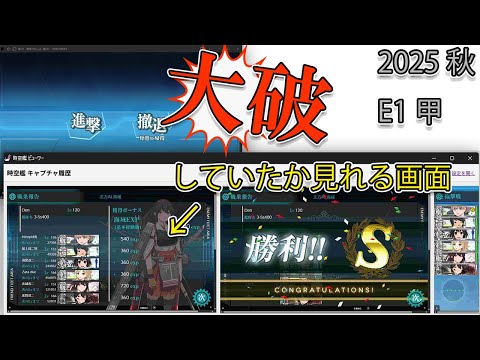
閲覧中のタブを自動でキャプチャし、保存・閲覧する拡張機能です。

艦これ用の拡張機能です。マウスクリック時に自動で画像を保存し、タイムラインで画像を閲覧できるツールです。ながらプレイで直前の艦隊の状態(大破)を失念した際に簡単に状態を確認するために作成しました。 【推奨「ページをアプリとしてインストール」】 ・艦これのゲーム画面(https://play.games.dmm.com/game/kancolle)をChromeのメニュー「キャスト、保存、共有」から「ページをアプリとしてインストール」することをおすすめします。 ページアプリとしてインストールしない場合、画像が自動保存される度にダウンロードが反応してしまい煩わしいです。 【画像の保存先について】 ・ダウンロードフォルダ内に「ZikukanRec」が生成され、このフォルダにキャプチャした画像が自動保存されます。 拡張機能側から画像を削除することはできないため、ファイルが増えて来たら手動で削除してください。 【便利機能】 個人的に欲しいと思った便利機能を追加しています。 ①ウィンドウサイズのゲーム画面に合わせた自動調整 ②スクリーンショットボタン ③音量ミュートボタン ④手動カウンターボタン ⑤複数設定できるメモ書き ⑥画像クリップ画面(4列3行グリッド表示ウィンドウ)  └キャプチャした編成や装備、ローカルの画像ファイル(改修計画や攻略編成等)をドラッグすることでメモとして固定表示できます 【ボタンの非表示設定】 ・設定画面でオン/オフや透明度、大きさを設定できます。またボタン上で右クリックすることで簡易非表示も可能です。 【通信について】 ・サーバーとの通信内容を解析する処理や、画像認識、マウスのゲーム内におけるクリック位置の取得等は行っていないため資材の集計やステータスの自動計算を行うことはできません。 自動操作(マクロ)機能もありません。

Details

  • Version
    2.00
  • Updated
    December 30, 2025
  • Offered by
    Den
  • Size
    44.51KiB
  • Languages
    日本語
  • Developer
    Email
    den@dentwo.com
  • Non-trader
    This developer has not identified itself as a trader. For consumers in the European Union, please note that consumer rights do not apply to contracts between you and this developer.

Privacy

Manage extensions and learn how they're being used in your organization
The developer has disclosed that it will not collect or use your data.

This developer declares that your data is

  • Not being sold to third parties, outside of the approved use cases
  • Not being used or transferred for purposes that are unrelated to the item's core functionality
  • Not being used or transferred to determine creditworthiness or for lending purposes

Related

Chrome Screen Capture

5.0

Easily answer "how to take screenshot" with Chrome Screen Capture. Instantly capture full page screen capture chrome.

Blackboard

3.8

Draw over webpages, capture and save full page screenshots

Chrome Screenshot

4.7

Use Chrome Screenshot: smart screenshot chrome extension! Capture, edit, save any page. Explore how to screenshot on chrome browser

Tabius - Automatic Tab Grouping Assistant

4.4

An Automatic Tab Grouping Extension for Your Browser.

pixiv ポップアップビューアー

4.8

pixivのイラスト・マンガ・小説を、ページ移動せずにポップアップで表示する拡張機能です。

Auto Clicker

3.9

Auto-click Chrome extension for automating repeated clicks on web pages

nico downloader

4.3

ニコニコからの動画保存をサポートする他、ニコニコを便利に使うための非公式の拡張機能です。

QuickDrag for Chrome

4.4

ドラッグ&ドロップジェスチャーの機能を拡張し、選択したURL・テキストのWeb検索、ページ上の画像の保存を可能にします。

SavedTabs - A better new tab and start page

4.8

Save your open tabs with one click and continue browsing later

Save All Resources

5.0

Automatically captures all resources loaded by any webpage and saves them as a ZIP file

ニコショ

0.0

ニコニコ動画のスクリーンショットを簡単に撮るChrome拡張

Remove Right Tabs By Misuta

0.0

右側のタブを閉じる拡張機能です。

Chrome Screen Capture

5.0

Easily answer "how to take screenshot" with Chrome Screen Capture. Instantly capture full page screen capture chrome.

Blackboard

3.8

Draw over webpages, capture and save full page screenshots

Chrome Screenshot

4.7

Use Chrome Screenshot: smart screenshot chrome extension! Capture, edit, save any page. Explore how to screenshot on chrome browser

Tabius - Automatic Tab Grouping Assistant

4.4

An Automatic Tab Grouping Extension for Your Browser.

pixiv ポップアップビューアー

4.8

pixivのイラスト・マンガ・小説を、ページ移動せずにポップアップで表示する拡張機能です。

Auto Clicker

3.9

Auto-click Chrome extension for automating repeated clicks on web pages

nico downloader

4.3

ニコニコからの動画保存をサポートする他、ニコニコを便利に使うための非公式の拡張機能です。

QuickDrag for Chrome

4.4

ドラッグ&ドロップジェスチャーの機能を拡張し、選択したURL・テキストのWeb検索、ページ上の画像の保存を可能にします。

Google apps