

图片翻译
2.8(
6 ratings
)ExtensionTools501 users

Overview
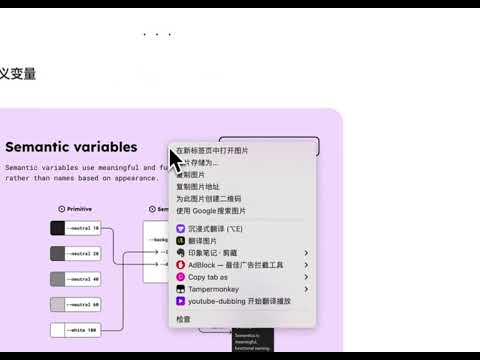
在网页中右键图片,选择“图片翻译”可以将图片直接翻译为中文内容的图片。
在网页中右键图片,选择“图片翻译”可以将图片直接翻译为中文内容的图片。
2.8 out of 56 ratings
Details
- Version0.0.2
- UpdatedJanuary 19, 2026
- Offered byEthan
- Size22.4KiB
- Languages中文(中国)
- Developer
Email
ethan@oksocool.com - Non-traderThis developer has not identified itself as a trader. For consumers in the European Union, please note that consumer rights do not apply to contracts between you and this developer.
Privacy

Manage extensions and learn how they're being used in your organization
图片翻译 has disclosed the following information regarding the collection and usage of your data. More detailed information can be found in the developer's privacy policy.
图片翻译 handles the following:
Authentication information
User activity
Website content
This developer declares that your data is
- Not being sold to third parties, outside of the approved use cases
- Not being used or transferred for purposes that are unrelated to the item's core functionality
- Not being used or transferred to determine creditworthiness or for lending purposes
Support
For help with questions, suggestions, or problems, please open this page on your desktop browser