Item logo image for びっくりスライド

びっくりスライド

Item media 2 (screenshot) for びっくりスライド
Item video thumbnail
Item media 2 (screenshot) for びっくりスライド
Item video thumbnail
Item media 2 (screenshot) for びっくりスライド

Overview

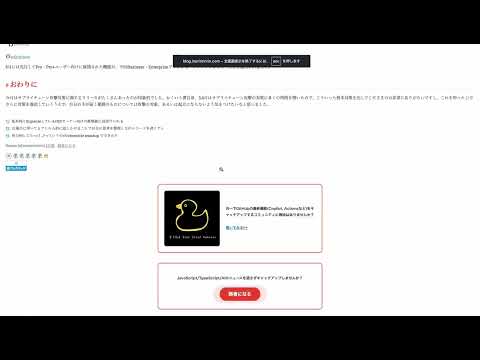
はてなブログなどの記事本文だけを抜き出し、モニター全体の全画面でプレゼンテーション表示する拡張機能。

はてなブログの記事をプレゼンテーションの場で使いたいと思ったことはありませんか? しかし普通にプレゼンに使おうとした際、私自身、以下の点を課題に感じていました。 - サイドバー、ブログ見出し、ブログヘッダなど、プレゼン内容とは関係ないものまで映り込んでしまう - 普通にブラウザで全画面表示してもブックマークバーが写りこんでしまうのでいちいち非表示にしないといけない - 同様にchrome拡張で使っているものも映り込んでしまう このリポジトリは以上の課題を解決し、はてなブログの記事をスライドでも使えるようにするためのchrome拡張機能です。はてなブログなどの記事本文だけを抜き出し、モニター全体の全画面でプレゼンテーション表示します。 もし拡張機能を気に入りましたら、ぜひGitHub Sponsorをおねがいします! https://github.com/sponsors/ysknsid25

Details

  • Version
    0.1.0
  • Updated
    August 5, 2026
  • Offered by
    kengo071225
  • Size
    14.49KiB
  • Languages
    日本語
  • Developer
    Email
    kengo071225@gmail.com
  • Non-trader
    This developer has not identified itself as a trader. For consumers in the European Union, please note that consumer rights do not apply to contracts between you and this developer.

Privacy

Manage extensions and learn how they're being used in your organization

びっくりスライド has disclosed the following information regarding the collection and usage of your data. More detailed information can be found in the developer's privacy policy.

びっくりスライド handles the following:

Website content

This developer declares that your data is

  • Not being sold to third parties, outside of the approved use cases
  • Not being used or transferred for purposes that are unrelated to the item's core functionality
  • Not being used or transferred to determine creditworthiness or for lending purposes

Support

For help with questions, suggestions, or problems, visit the developer's support site

Related

Lucid – Reader Mode & Focus Reading

0.0

Strip the clutter from any article. Control font, size and width, and turn on focus reading. Fast, private, works offline.

Mouse Highlight & Annotation Tool

5.0

Highlight your cursor and draw temporary annotations on any webpage. Perfect for presentations, demos, and screen sharing.

noteアナライザー

0.0

note のアクセス統計を保存し、記事比較と時系列の推移を確認できる拡張機能。

Image Blocker

5.0

An extension that simplifies browsing by letting you easily hide or show images with a single click.

amecare

0.0

アメブロの記事の作成や更新を楽で便利にするアメブロユーザーのためのChrome拡張機能です。

Timer for Google Slides

0.0

Googleスライドのプレゼン中に1〜9キーを押すと、その分数のカウントダウンタイマーを表示。クリックで分数入力(最大60分)、0キーで非表示。

Presenter Marker

0.0

ブラウザ上で直接画面に書き込めるプレゼン支援ツール。ペン・矢印・矩形・テキスト入力に加え、ズームルーペやスポットライトで分かりやすい説明をサポートします。

HTMLpresenter

0.0

Adds a presenter view to any HTML presentation opened in Chrome.

GSlide Presenter

0.0

Sets Google Slide to Presentation mode while retaining chrome tabs

Snapper

0.0

An easy to use extension for taking screenshots in the browser

Presentify

5.0

Convert any webpage into a presentation canvas with drawing, sticky notes, and more.

Slides.com Companion

3.8

Chrome/Edge extension that aims to add a few missing features (free) to Slides.com presentations.

Lucid – Reader Mode & Focus Reading

0.0

Strip the clutter from any article. Control font, size and width, and turn on focus reading. Fast, private, works offline.

Mouse Highlight & Annotation Tool

5.0

Highlight your cursor and draw temporary annotations on any webpage. Perfect for presentations, demos, and screen sharing.

noteアナライザー

0.0

note のアクセス統計を保存し、記事比較と時系列の推移を確認できる拡張機能。

Image Blocker

5.0

An extension that simplifies browsing by letting you easily hide or show images with a single click.

amecare

0.0

アメブロの記事の作成や更新を楽で便利にするアメブロユーザーのためのChrome拡張機能です。

Timer for Google Slides

0.0

Googleスライドのプレゼン中に1〜9キーを押すと、その分数のカウントダウンタイマーを表示。クリックで分数入力(最大60分)、0キーで非表示。

Presenter Marker

0.0

ブラウザ上で直接画面に書き込めるプレゼン支援ツール。ペン・矢印・矩形・テキスト入力に加え、ズームルーペやスポットライトで分かりやすい説明をサポートします。

HTMLpresenter

0.0

Adds a presenter view to any HTML presentation opened in Chrome.

Google apps